Ask your Odoo anything, from Claude or ChatGPT
Paste one URL into your assistant and ask questions in plain English — last month's revenue, which deliveries are late, who your top customers are. It runs inside Odoo, answers as you, and records every question it was asked.
One-time. Odoo 19. Installs in a minute.
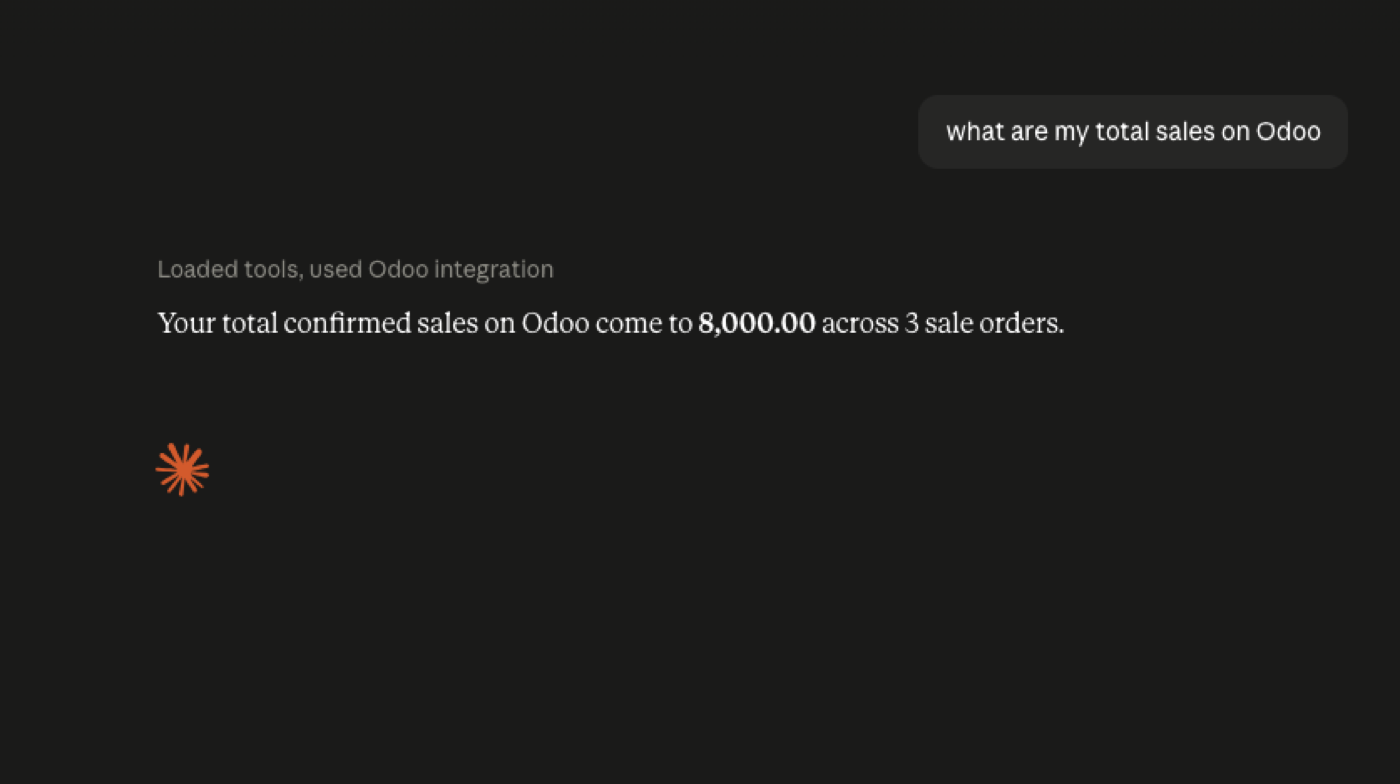
Setup is one copy and one paste.
Install the app
From the Odoo App Store, into your existing Odoo 19. No separate server, no middleware, no extra service to run or pay for.
Copy your server URL
The Connect screen shows one address and checks everything that has to be true before it will work — public HTTPS, reachability, permissions. Anything wrong gets a plain-English explanation and a button that fixes it.
Paste it into your assistant
Claude, ChatGPT, Cursor, VS Code, or any MCP client. Sign in with your normal Odoo login — SSO and 2FA included — and click Allow. VS Code and Cursor install in one click.
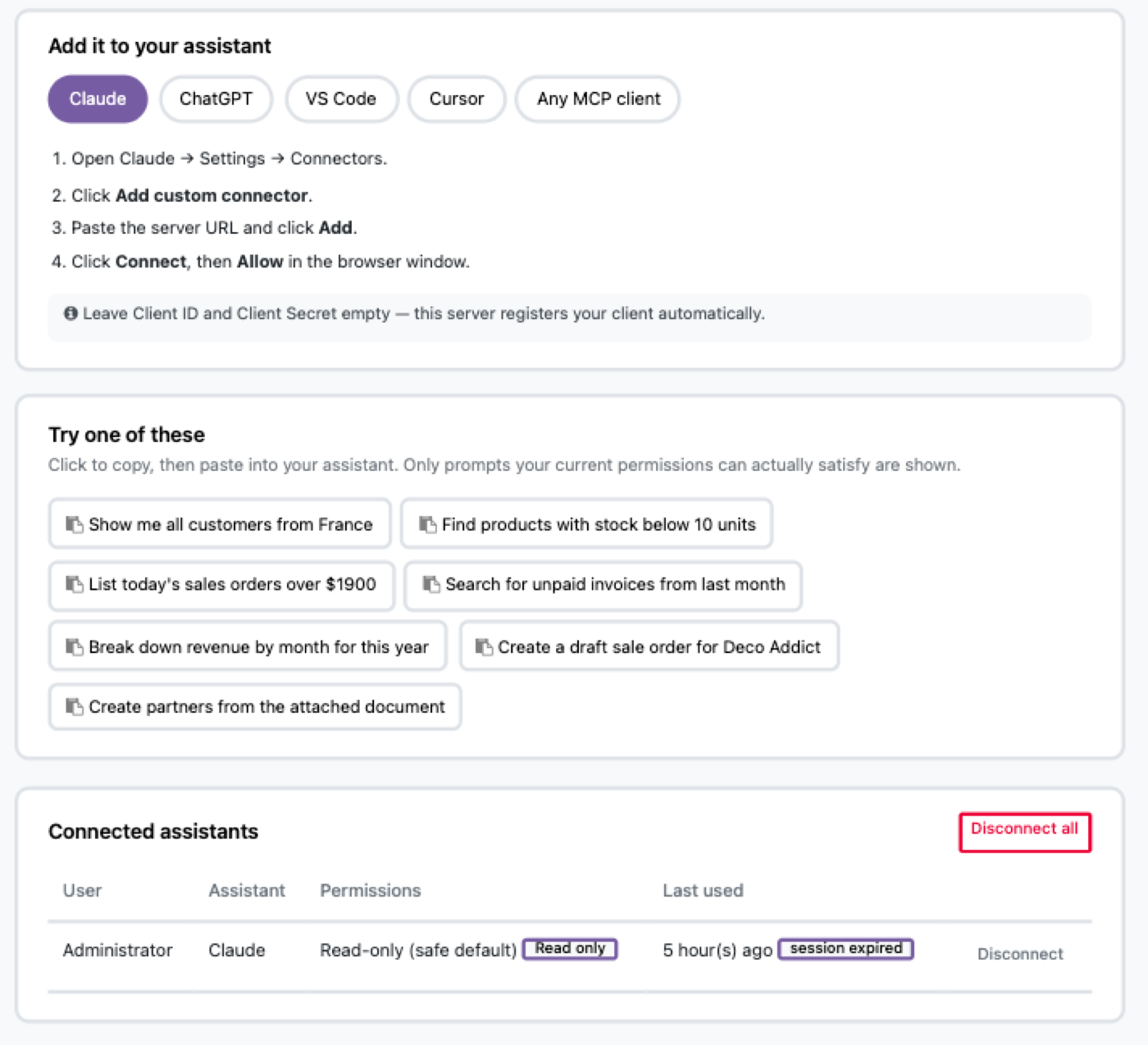
No API keys to generate. No config files to edit. No mcp-remote wrapper.
The questions people actually ask on day one.
The last two only work if you turn writing on. It is off by default, and it stays off until an administrator decides otherwise.
It runs as you — so it can't see anything you can't
Every request executes as the signed-in Odoo user. Your access rights, record rules, field permissions and company access all apply underneath. A salesperson's assistant sees their pipeline. It cannot open payroll, because their account cannot open payroll.
There is no service account, no shared admin token, no second permission system to keep in sync with the first.
Read-only by default
Writing is off until someone turns it on. The safe setting is what you get by not deciding.
Approval before changes
Turn writing on and every change can become a request a person approves — the AI drafts, a human commits.
Every question logged
One row per call: who asked, which tool, which records, when, how long, and whether it was allowed.
Any MCP client, including the one you already use
| Client | Setup |
|---|---|
| Claude | Paste the URL under Settings → Connectors |
| ChatGPT | Paste the URL under Connectors (Developer Mode, paid plan) |
| VS Code | One-click install button |
| Cursor | One-click install button |
| Anything else | Standard MCP — remote HTTP, OAuth discovered automatically |
Built on the open Model Context Protocol, speaking both the current revision and the older handshake-based ones — so connectors built against either generation keep working.
No middleware. No second thing to run.
Most connectors are a separate process you host, monitor, secure and upgrade alongside Odoo. This one is an Odoo module. It runs in your Odoo, deploys with your Odoo, backs up with your Odoo, and needs nothing installed beyond what your server already has.
- Nothing extra to host. No Node process, no proxy, no container.
- Nothing extra to secure. One system to patch, not two.
- Nothing extra to pay for. No per-seat pricing, no metered calls, no subscription.
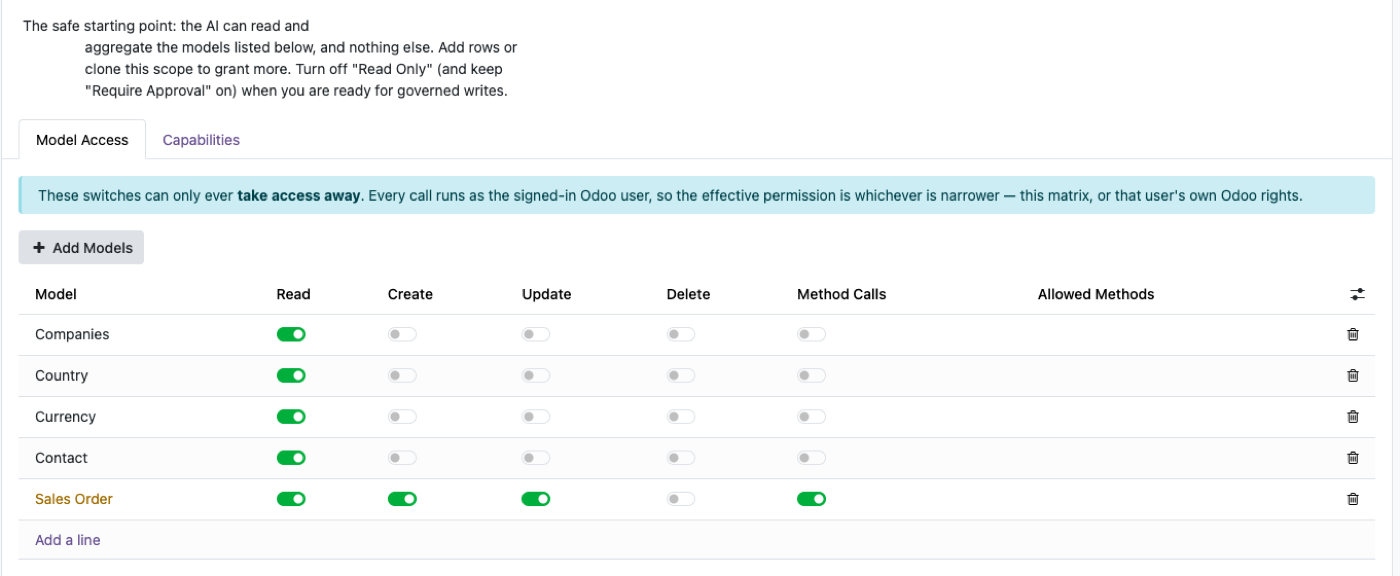
One row per model, one column per operation. These switches can only ever take access away.
$199, once
One-time purchase on the Odoo App Store. Unlimited users. Unlimited questions. No metering, no per-seat cost, no subscription. Your AI usage is billed by your AI provider, as it already is.
Get it on the Odoo App Store — $199Try it before you install it.
A live Odoo on sample data, with nothing to sign up for. Open the settings screen, copy the URL, and connect your own assistant to it.
sandbox.odin.ist/odoo/settings#mcp_governance_suite
Login admin · Password admin
Questions people ask before buying
Do I need an OpenAI or Anthropic API key?
Does my Odoo data get sent anywhere?
Can it change or delete records?
What if it gets something wrong?
Which Odoo versions?
What if my Odoo isn't on the public internet?
Can I limit it to one team?
Ask your first question in about five minutes
Every Odoo I have worked on had the answer somewhere. Finding it meant knowing which report, which filter, which view — so the people who needed the number asked the person who knew where it lived, and waited.
The connectors I tried either wanted admin credentials for the whole database or needed a second server to babysit. Neither was something I would put in front of a client.
So we built this one the other way round: it runs inside Odoo, it runs as the person asking, and it cannot do anything they could not already do by hand. Then we spent most of our time on the boring half — what happens when it writes, and how you prove afterwards what it did.
If it does not do what this page says, email me.
Andrew — [email protected]