Let your team use AI on Odoo without giving it the database
Every request runs as the person who asked — bounded by their own Odoo permissions, narrowed further by a policy you set, and recorded in a row with their name on it. No service account. No shared admin token. Read-only until you decide otherwise.
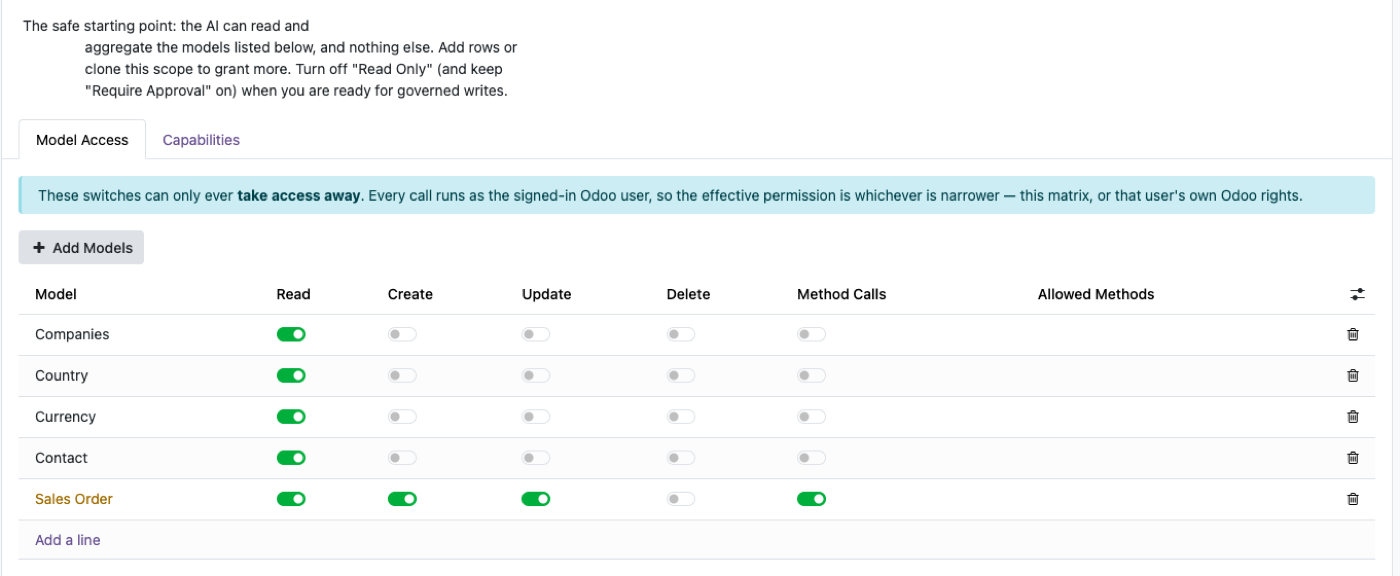
This is the whole argument, in one screen. One row per model. One column per operation. Every switch can only ever take access away.
The problem with most AI connectors
Ask a vendor how their connector authenticates. You usually get one of two answers.
“It uses an API key.”
There is an account, the account has permissions, and everything the AI does is that account's doing. The key is almost always scoped generously, because a narrow key breaks the demo.
“It runs as a service user.”
The same thing, said honestly.
Both share one property: the AI's permissions have nothing to do with the permissions of the person using it. Every access decision your organisation has already made is bypassed the moment the request leaves the chat window. Your accounts clerk gets your finance director's visibility, through a chat box, without anyone changing a setting.
That is the thing to be worried about. It is worth being worried about.
Four gates. Every request passes all of them.
What the user consented to
OAuth 2.1 with PKCE. Each person authorises their own assistant with their own Odoo login, approving a specific scope. A connection authorised read-only cannot later write. Revoke any single connection from one screen without touching anyone else's.
What you allow
A governance scope: read-only or read-and-write, an hourly call ceiling, a hard cap on rows per query. Ships read-only.
What the AI may touch
A per-model matrix. Read, create, update, delete and business-method calls, each switched independently, per model. Plus field blacklists for columns that never leave the building, and a record filter per model — so “read orders” can mean “read orders that aren't drafts”.
What their Odoo account permits
Native access rights and record rules, applied underneath everything above, because the request genuinely is theirs.
Gates 2 and 3 can only subtract.
Switching something on in the matrix does not grant access — it stops that layer blocking something the user could already do by hand. There is no configuration mistake that gives anyone more access than they started with.
That is what makes it safe to start permissive and tighten later, rather than spending two months in a permissions workshop before anyone gets value.
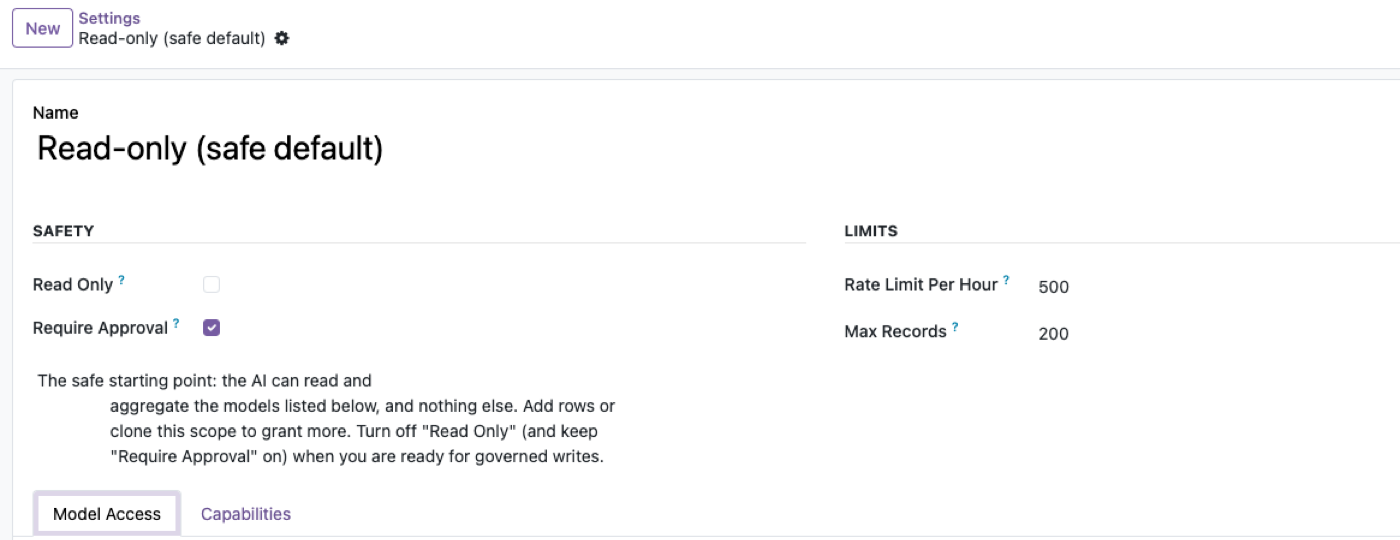
Gate 2 — the scope that ships. Read-only, approval required, an hourly ceiling and a row cap.
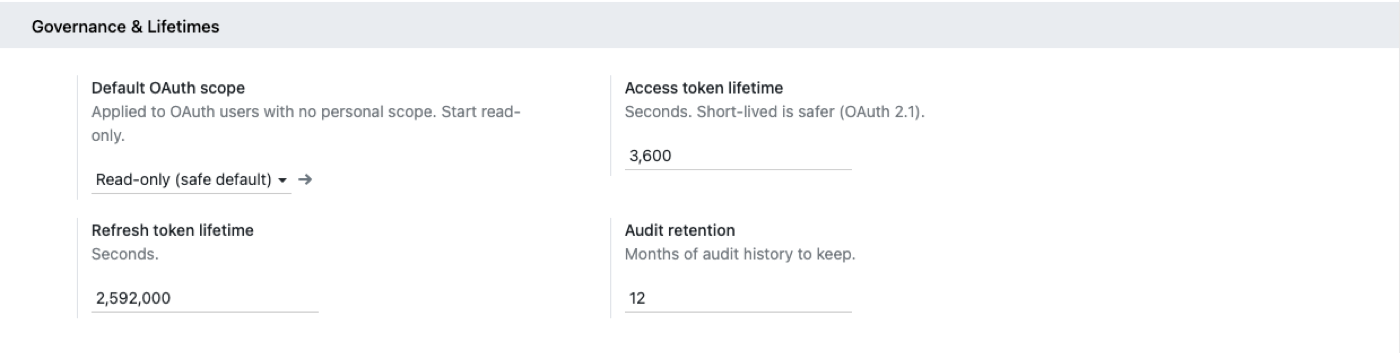
Short-lived access tokens, and audit retention you set in months.
“It can only do what you can do” is necessary. It isn't sufficient.
Your operations manager can legitimately delete a confirmed order. So an assistant running as them can delete a confirmed order — correctly, by the rules, with full authority. It just did it because a language model inferred it from a sentence.
Running as the user gives you a ceiling, and that ceiling is one person's full authority. For some of your people, that is quite a lot.
Which is why the gate that actually matters is the next one.
The AI drafts. A person commits.
With approval required, an AI asked to create a purchase order does not create one. It creates a pending request — the operation, the model, the exact values, and the person who asked — and waits.
A human approves or rejects. On approval it executes as the original user, so their permissions are checked a second time at the moment it actually runs.
Why this is the thing that lets you say yes
The argument against AI writing to an ERP is rarely “it will be wrong.” It is “it will be wrong and I won't find out until it matters.”
With a gate, being wrong is cheap — someone reads a queue item and clicks reject. Without one, being wrong is a phone call to a customer.
One row per call, with a person's name on it
Who asked. Which tool. Which model and records. From what IP. How long it took. An estimated token cost. And whether it succeeded, errored, or was denied.
Two things that decide whether an audit trail is real:
Every row is attributable to a person
A connector running as a service account writes the same name on every row, which is a list of events, not a record of who did what.
Refusals are logged too
A denied call is the more interesting event — it means something tried to exceed its scope, which is either a misconfiguration or a signal. You want both.
Retention is configurable; old rows purge on a schedule you set.
Where this doesn't protect you
It can't protect you from a user's own authority
Grant delete in the matrix, turn approval off, and an assistant running as someone with delete rights can delete. Layers are places to say no; they only work if someone says no in one of them.
Per-user permissions make some questions unanswerable
A salesperson asking about company-wide margin gets their slice, not the company's. That is correct behaviour and it will still generate support tickets.
Read-only by default disappoints people
The first reaction to a read-only assistant is that it is a toy. It is the right starting position and you will still spend a week explaining that.
It is slower to set up than a service account
An admin key works in five minutes. Deciding what the assistant may touch takes longer. That decision is the point, but somebody still has to make it.
An Odoo module, not a second system
- Runs inside Odoo. No separate process to host, monitor, secure or upgrade. Deploys with your Odoo, backs up with your Odoo.
- Nothing beyond what your server already has. No Node runtime, no container, no proxy.
- Nothing sent to us. There is no vendor cloud in the path. Your Odoo talks to the assistant your team already pays for.
- Multi-company aware. Company boundaries apply to AI requests the same way they apply in the interface.
- Standard protocol. Model Context Protocol over HTTPS, current revision and the older handshake-based ones, so you are not locked to one AI vendor.
What review boards ask
Whose credentials does a request run as?
Can we pilot this with one team?
What happens when someone leaves?
Can we turn the whole thing off?
Where is data processed?
Does this satisfy our auditor?
What does it cost?
Start read-only. Widen when you're ready.
The safe configuration is the default one — install it, let a team read, and turn on writing only when you have watched it for a fortnight.
Four questions worth asking any AI/ERP vendor, including us
- Whose credentials does a request run as?If it's a service account, everything else is decoration.
- Can I make it read-only, and is that the default?
- Can a write become a request instead of an action?
- Does the log name a person for every call, including refused ones?
Longer version, with the reasoning: An AI connector should never have its own ERP login.