An AI connector should never have its own ERP login
Most integrations authenticate as a service account with broad rights. That single design choice decides how much damage is possible, who is accountable for it, and whether you can ever say yes to write access. Here is the alternative, and what it costs.
Ask a vendor how their AI connector authenticates to your ERP. You will usually get one of two answers.
“It uses an API key.” Then somewhere there is an account, that account has permissions, and everything the AI does is that account's doing. If the key is scoped generously — and it usually is, because a narrow key breaks half the demos — then every person who can reach the assistant can reach everything the key can reach. Your accounts clerk gets your CFO's visibility, through a chat box, without anyone changing a permission.
“It has a service user with admin rights.” Same thing, said honestly.
Both answers share a property worth naming: the AI's permissions are unrelated to the permissions of the person using it. Every access-control decision your organisation has already made — carefully, over years, in a system designed for exactly this — is bypassed the moment the request leaves the chat window.
There is a better default, and it is not more complicated. It is less.
Run as the person, not as the product
The alternative: every AI request executes as the signed-in user.
Not as a service account acting on their behalf. As them. The session the tool call runs in is their session, with their permission set, their record rules, their field-level restrictions, their company access.
The consequence is worth stating plainly, because it is the whole argument:
The AI cannot see or do anything the person using it could not already see or do, by hand, in the interface.
A salesperson's assistant reads their own pipeline, because that is what their account reads. A warehouse user's assistant cannot open payroll, because their account cannot open payroll. Nobody writes a policy for this. Nobody maintains a second permission model that drifts from the first. The permissions you already built are the permissions that apply.
It also fixes accountability, which matters more than it sounds. When the log says a record changed, it names a person — not api_user_prod. That is the difference between an audit trail and a shrug.
Why that isn't enough on its own
Here is the part most vendors skip, and the reason I would not buy on this promise alone.
Running as the user bounds the worst case. It does not make the ordinary case safe.
Your operations manager can legitimately delete a confirmed order. That is a real permission they hold for real reasons. So an assistant running as them can delete a confirmed order — correctly, by the rules, with full authority. It just did it because a language model inferred it from a sentence.
“The AI can only do what you can do” is necessary. It is not sufficient. What it buys you is a ceiling, and the ceiling is one person's full authority, which for some of your people is quite a lot.
So the second layer has to narrow, deliberately, below what the user could do.
The four gates
Four checks, and every request passes all of them. The effective permission is whichever is narrowest — which means each layer can only ever take access away.
What the user consented to
OAuth 2.1 with PKCE. When someone connects their assistant they approve a specific scope, and a connection authorised to read cannot later write, whatever else changes. Revocable from one screen, per connection, without touching anyone else.
What the administrator allows
A governance scope: read-only or read-and-write, an hourly call ceiling, a hard row cap. Read-only by default, so the safe state is the state you get without deciding anything.
What the model may touch
A per-model matrix — read, create, update, delete, and business-method calls, each independently switchable. Plus field blacklists for the columns that never leave the building, and an extra record filter per model, so “read orders” can mean “read orders that aren't drafts.”
What the user's own account permits
The ERP's native access rights and record rules, applied underneath everything above, because the request genuinely is theirs.
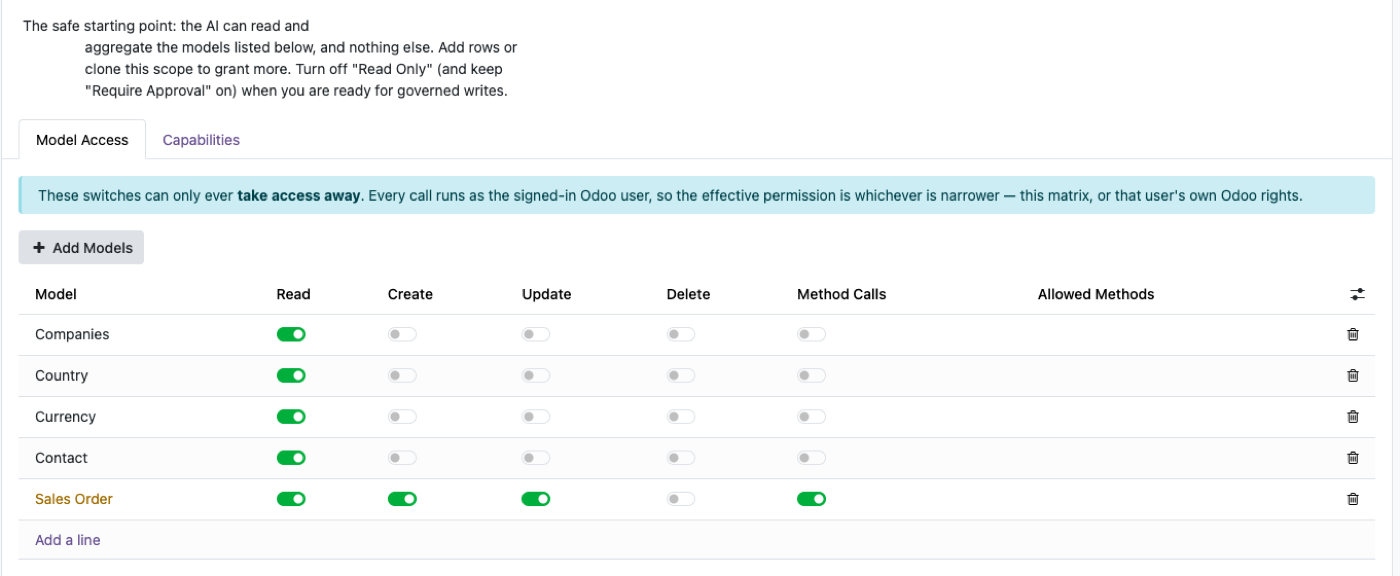
The property that makes this reviewable rather than merely elaborate: layers 2 and 3 can only subtract. Switching something on in the matrix does not grant it — it stops that layer blocking something the user could already do. There is no configuration mistake that hands anyone more access than they started with. That is what makes it safe to start permissive and tighten, instead of the usual paralysis.
The gate that actually closes the deal
Everything above is preventative. The one that changes the conversation is different: a mutating call can become a request instead of an action.
With approval required, an AI asked to create a purchase order does not create one. It creates a pending request — the operation, the model, the exact values, the person who asked — and a human approves or rejects it. On approval it executes as the original user, so their permissions are checked a second time at the moment it actually runs.
This is what lets an organisation say yes.
The argument against AI writing to an ERP is almost never “it will be wrong.” It is “it will be wrong and I will not find out until it matters.” An approval queue answers the objection precisely, and it answers it as a mechanism rather than a promise. The AI drafts. A person commits. The drafting is where the time was going anyway.
And notice what it does to the risk calculation: with a gate, being wrong is cheap. Someone reads a queue item and clicks reject. Without one, being wrong is a phone call to a customer.
The trail
One row per call. Who, which tool, which model, from what address, how long it took, what it cost in tokens, and whether it succeeded, was refused, or was denied outright.
This is the least interesting layer to build and the one your auditor asks about first. Two questions decide whether a trail is real:
- Is every row attributable to a person?If your connector runs as a service account, every row names the same account, and the log is a list of things that happened rather than a record of who did them.
- Are refusals logged as well as successes?A denied call is the more interesting event. It tells you something tried to exceed its scope — which is either a misconfiguration or a signal, and you want both.
What this costs
Being straight about the trade, since the rest of the piece is an argument for one side.
- It is slower to set up.A service account with admin rights works in five minutes. Four gates means someone decides what the assistant may touch. That decision is the point, but it is still a decision, and somebody has to make it.
- Read-only by default disappoints people.The first reaction to a read-only assistant is that it is a toy. It is the correct starting position and it still feels like a limitation, and you will spend a week explaining that.
- It cannot protect you from a user's own authority.If someone has delete rights and you grant delete in the matrix and turn the approval gate off, the AI can delete. Layers are not magic; they are places to say no, and they only work if someone says no in one of them.
- Per-user permissions make some questions unanswerable.A salesperson asking about company-wide margin gets their slice, not the company's. That is correct, and it will still generate a support ticket.
Four questions for any vendor
Whatever you end up buying, including nothing:
- Whose credentials does a request run as? If the answer is a service account, everything below is decoration.
- Can I make it read-only, and is that the default? Safe should be what you get by not deciding.
- Can a write become a request instead of an action? Without this, “AI can update records” is a policy question you will keep deferring.
- Does the log name a person for every call, including refused ones?
A vendor who answers all four crisply has thought about the problem you actually have. A vendor who answers the first one with “don't worry, it's secure” has answered it.
We build AI MCP, an Odoo app that connects Claude, ChatGPT, Cursor and any other MCP client to Odoo with these four gates in place. Every call runs as the signed-in Odoo user; the default scope is read-only; writes can be routed through human approval; and every call lands in an attributable audit row.
Related reading
Read-only, by default, from the first minute.
Open the sandbox and look at the scope before you decide anything.