GDPR data access compliance in Odoo.
GDPR's data-minimization principle doesn't just govern what you collect — it governs who can see it afterward. Guidance on the principle is consistent on this point: only the people who need a piece of personal data for their specific role should be able to access it, full stop. That's an access-control requirement as much as a policy one, and it's where Odoo's native permissions most often fall short of the bar.
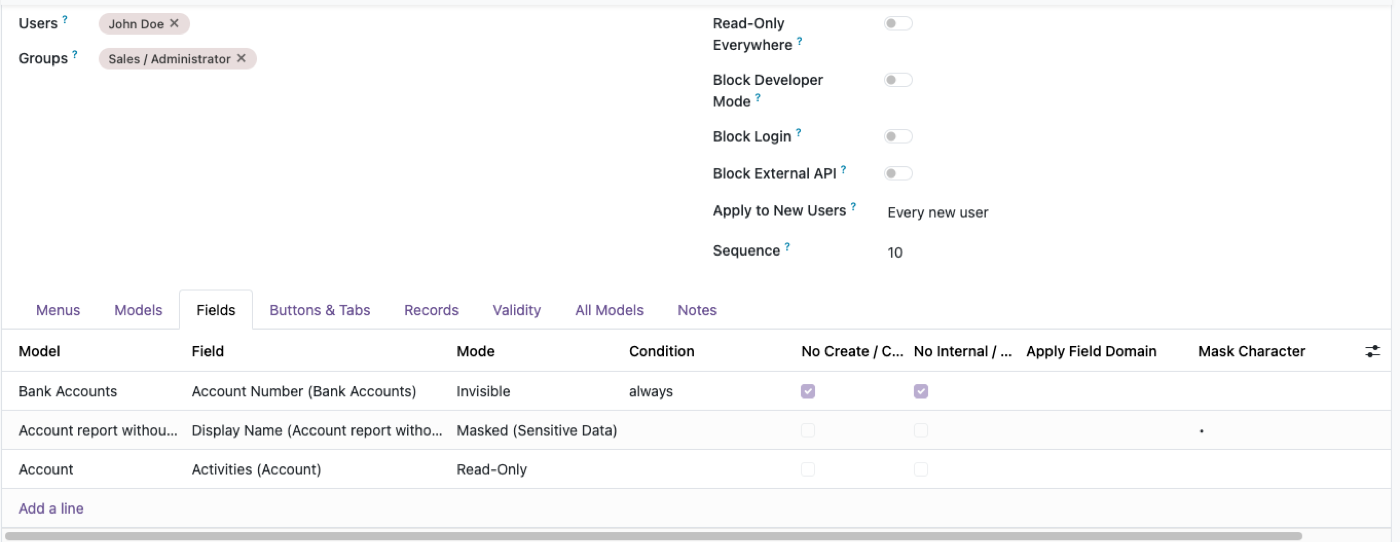
Scoped by role, not by good intentions.
Data-minimization guidance is specific: HR should be able to see sensitive employee records; other departments generally shouldn't. Payroll should be able to see compensation data; a sales manager pulling a headcount report shouldn't need to. Role-based access control is explicitly named as one of the standard ways to meet this — alongside masking and pseudonymization for cases where a field needs to be usable without being fully exposed to everyone who touches the record it lives on.
All-or-nothing field access
Odoo's native model-level field restriction blocks a field for every group not explicitly listed — there's no native middle ground for "HR can see it in full, support can see it masked." Full breakdown →
No audit-ready export of the rule set
Native groups and record rules live scattered across Settings screens and XML — workable day to day, hard to hand to an auditor as a single artifact showing exactly what was allowed and when.
- MaskingA bank account or ID number field can render as ••••1234 for most profiles and in full only for the ones that genuinely need it — without hiding the field outright.
- Role-scoped access by departmentAccess Profiles targeted at HR, payroll, or finance specifically, rather than broad groups that accumulate access over time.
- JSON-exportable rule setsA concrete, reviewable record of what a role was permitted to do — useful evidence, not a verbal description, if a DPO or auditor asks to see your access policy.
- Time-boxed accessAccess to personal data that expires with a contract or a project, instead of quietly outliving the reason it was granted.
The rest of the cluster
Before you set it up
Does installing this make us GDPR compliant?
No single tool does — compliance covers retention, consent, breach process and more, not just access control. What this addresses specifically is the access-control piece: scoping who can see and export personal data, and proving it if asked.
Can we produce evidence of our access rules for an audit?
Yes — every Access Profile exports as JSON, which is a concrete, reviewable artifact of exactly what a role was allowed to do and when it was set, rather than a verbal description of your Odoo groups.
Does masking count as pseudonymization under GDPR?
That's a legal determination for your DPO or counsel to make for your specific case — we're not a law firm. What we can say technically: masked fields keep the underlying value intact for authorized profiles while showing a partial, non-identifying value to others, which is the same mechanism data-minimization guidance points to.
Ready to lock this down?
Try it on the live sandbox first — nothing to install.