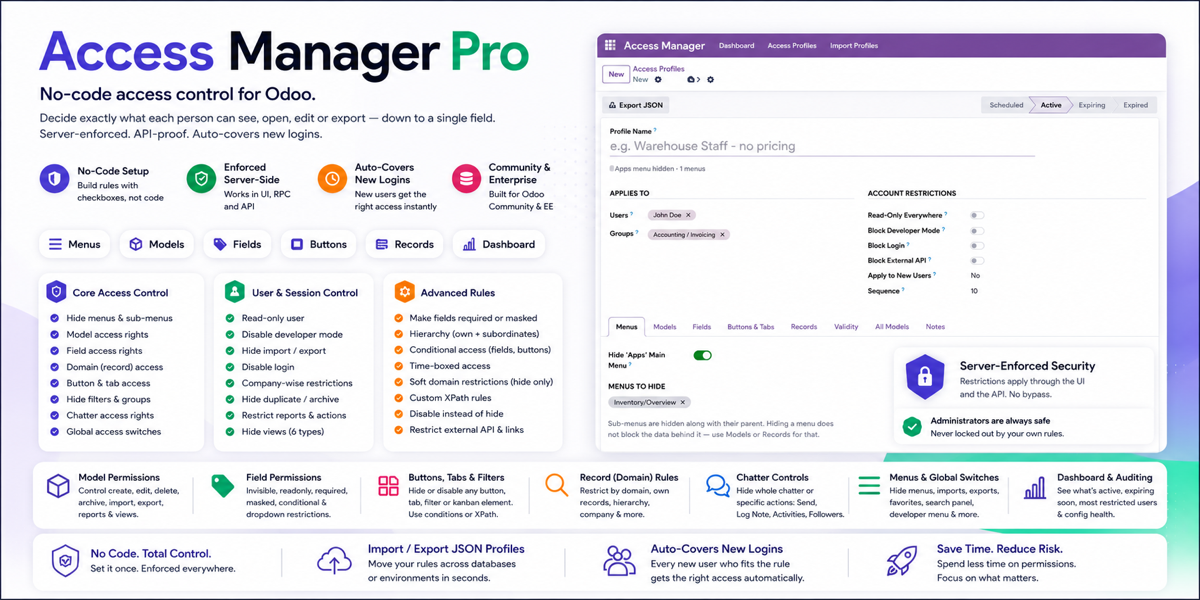
No-code access control for Odoo.
Decide exactly what each person can see, open, edit or export — down to a single field — without writing a line of code. Enforced on the server, not just hidden in the interface, so it holds even over the API.
Don't take our word for it. Try it.
Build a real profile, hide a real field, watch the restriction hold. This is a shared demo, so please be considerate of the next visitor — undo anything you change before you leave.
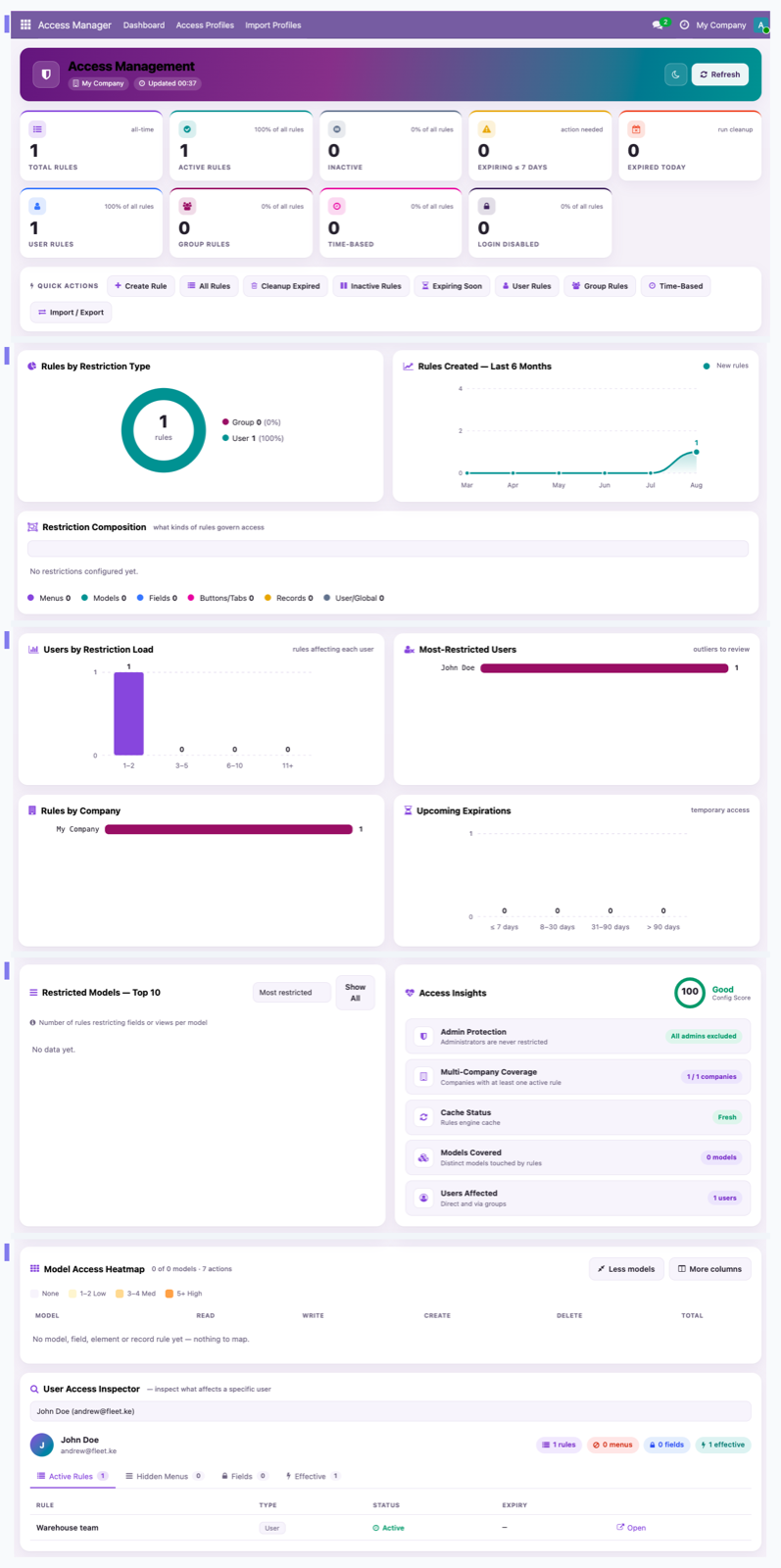
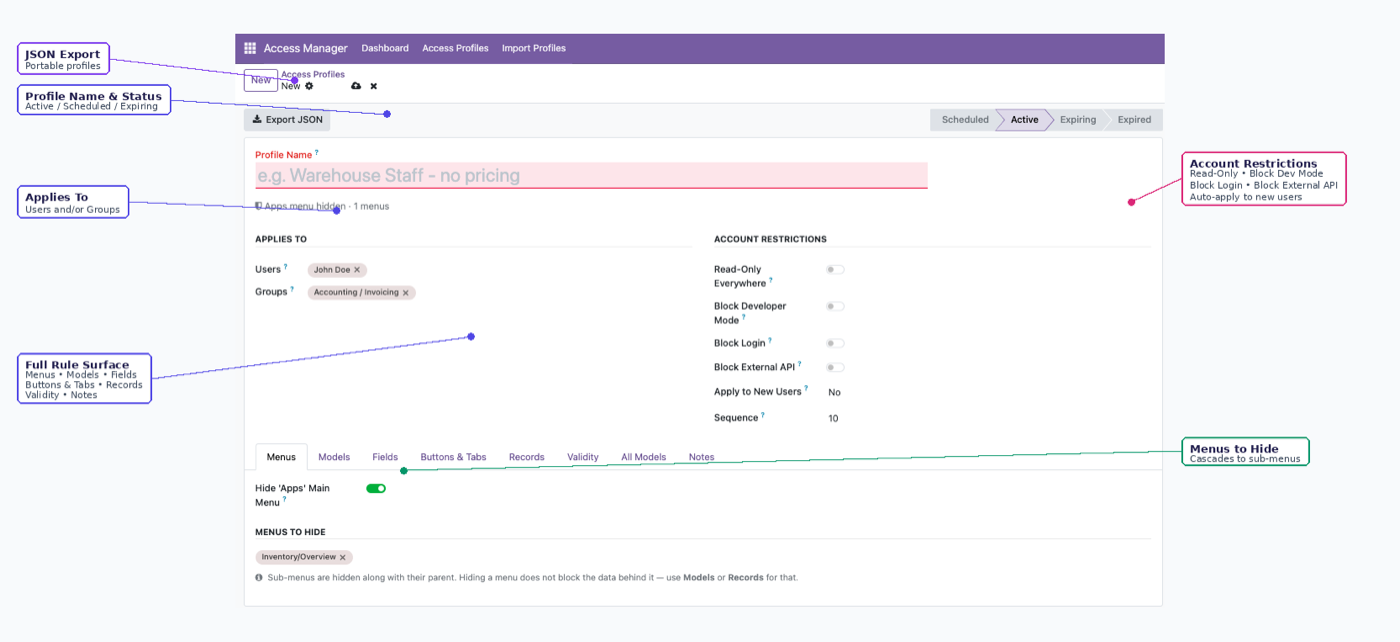
One app, every layer of the interface
Menus, models, fields, buttons, records, chatter and sessions — configured from a single screen, no development required.
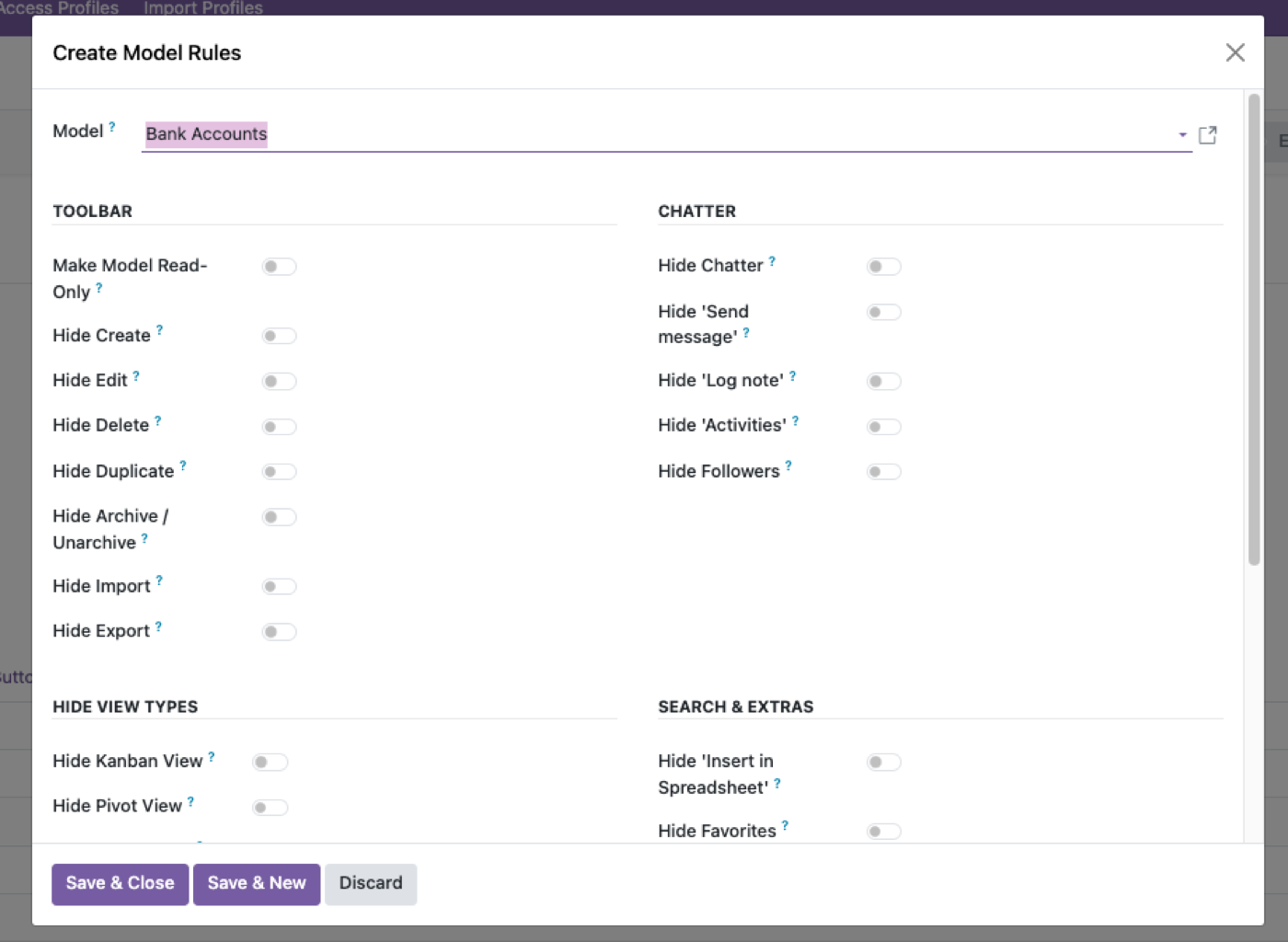
Nine switches. One model at a time.
Create, Edit, Delete, Duplicate, Archive, Import, Export, Reports, Views — enforced on the server, so a hidden Delete button also means a refused delete request. More on Odoo user permissions.
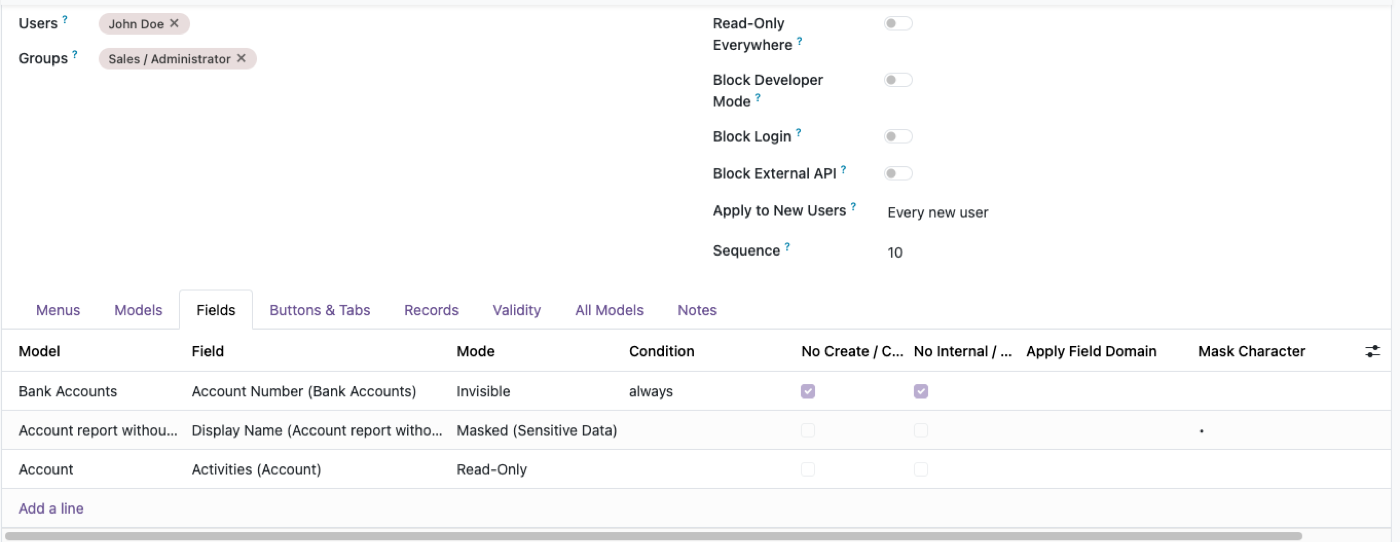
Point at one field. Decide everything about it.
Invisible, read-only, required, or masked — ••••••1234 style, for card numbers, IDs, bank details. Nothing this precise on the next app you'd try. Deep dive: field-level security in Odoo.
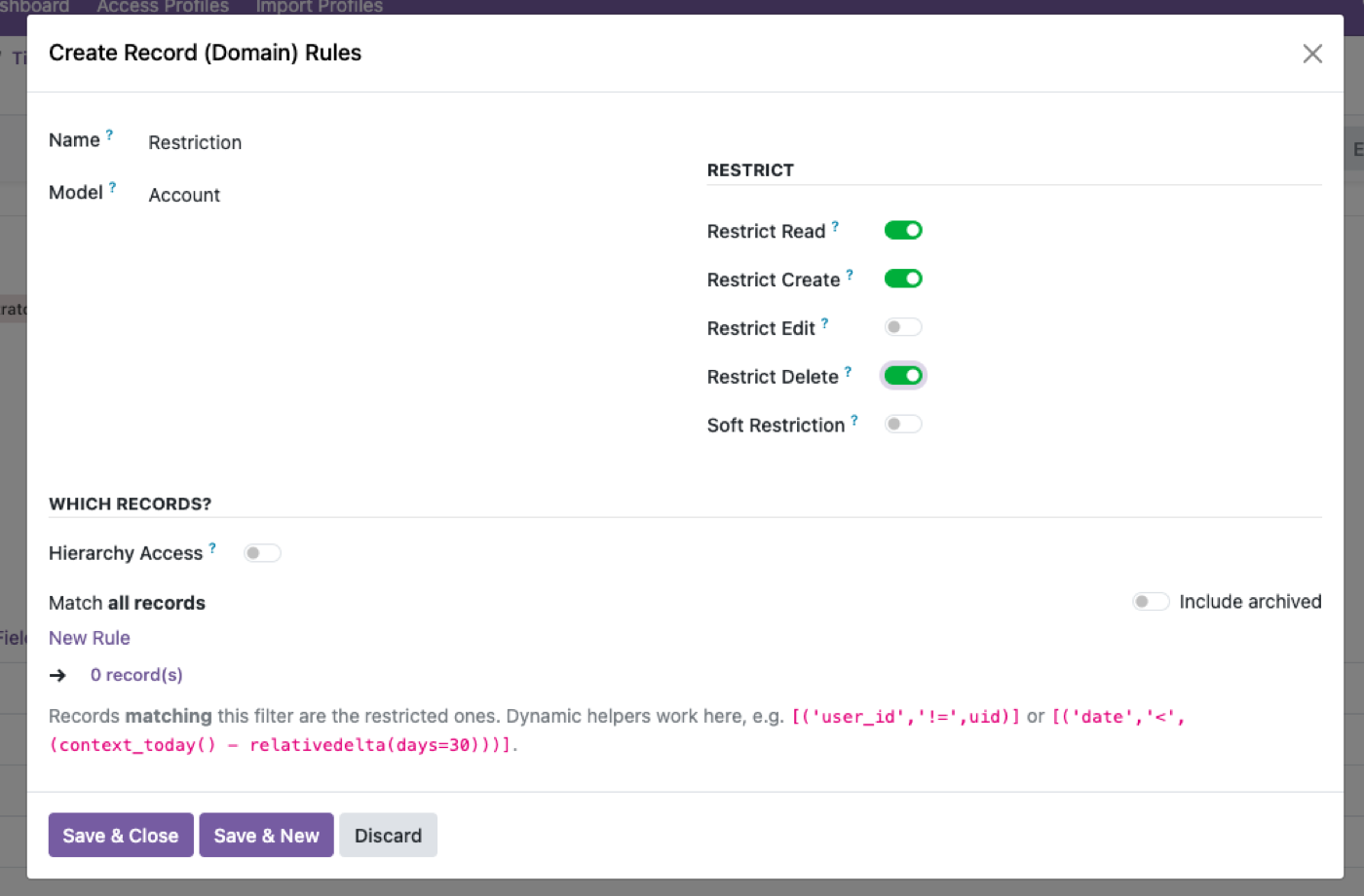
Restrict by domain — or just by who reports to whom
"Own + subordinates" reads the real manager chain from Employees. Nobody has to be re-taught who reports to whom. Also covers company boundaries — see role-based access control in Odoo and multi-company access control in Odoo.
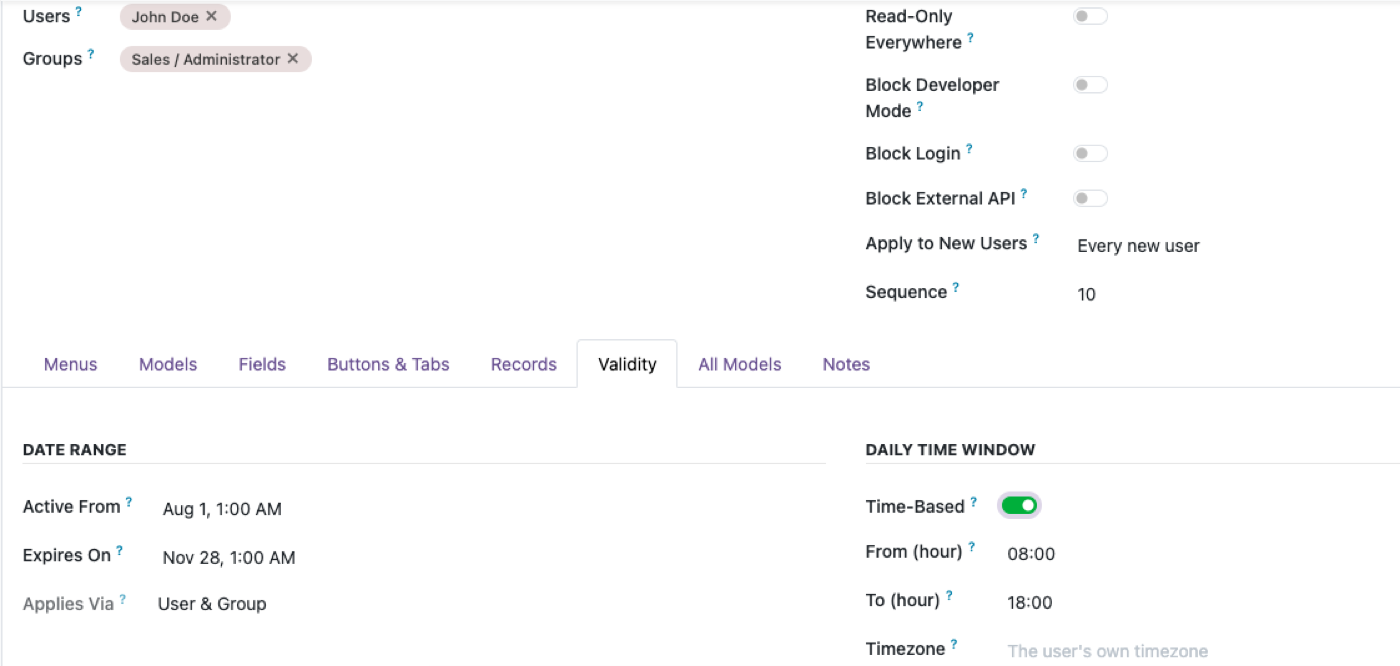
Switches for the person, not the model
Read-only, disable login, block the external API (XML-RPC, JSON-RPC, API keys), disable developer mode, time-boxed access. Administrators are structurally exempt — you can't lock yourself out. Detail: blocking the Odoo external API per user.
Where the restriction is enforced
Every rule this app creates is applied on the server, not in the browser.
That sounds like an implementation detail and it's the whole product. An access restriction configured in a view — a hidden button, a hidden menu, a field removed by XML inheritance — only exists for requests that render that view. Odoo's external API doesn't render views. Neither does an export, a report, or a connected AI assistant.
So the test worth applying to any Odoo access module, including this one, is: does the restriction hold when the request doesn't come from a browser?
Here it does. A hidden Delete button also means a refused delete request over XML-RPC. An invisible field is absent from the API response, not hidden with CSS. A masked value is masked in an export.
Two honest qualifications:
- A hidden menu is a navigation convenience, not access control. Use model or record rules to actually block data. Menus are for tidiness.
- These rules can only narrow. The effective permission is always the narrower of this app's rules and the user's own Odoo access rights — so nothing configured here can grant access that Odoo's own groups don't already allow. That's a safety property, not a limitation.
More depth: blocking the Odoo external API per user and Odoo security groups.
A few things you won't find in a typical access app
Data masking
Show ••••••1234 instead of the real value. See data masking in Odoo.
Time-boxed access
A rule that starts on a date, expires on another, even a daily window.
Block the external API
Stop a restricted user reaching Odoo through a script, not just the UI.
Portable JSON profiles
Export rules as JSON, import into another database — managing access rights in Odoo.
What this doesn't do
- It doesn't replace Odoo's security groups. It layers on top. Your existing group structure stays intact, and removing this module returns you to it unchanged.
- It can't grant access. Rules narrow only. If someone's groups don't allow a model, nothing here makes it reachable.
- Masking is not encryption. A masked field shows
••••••1234to a restricted user, but the real value is still in the database. Anyone with database or backup access has it. See data masking in Odoo. - It doesn't audit historical access. It controls what people can do from now on. It won't tell you what someone saw last March.
- It won't decide policy for you. Deciding who should have what is the hard half, and it stays yours.
$343. Once.
Buy it once — $343 on the Odoo Apps Store. OPL-1 licence, Odoo 19, Community and Enterprise. No per-user fee.
Buy on Odoo App StoreOr get it free.
Every module we've built is installed at no extra cost on an Odin deployment — from $150/month for up to 25 people, unlimited users at $450. That includes this one, the Odoo MCP server, the Shopify connector and five more, plus hosting, backups, upgrades and the AI module builder.
See Odin pricingIf you're already running Odoo somewhere you're happy with, buy the module. If you're paying a partner per user, run the second number.
FAQ
Does this replace Odoo's own groups and access rights?
No — it layers on top. The effective permission is always the narrower of this app's rules and a user's own Odoo access rights. For API-level control see blocking the Odoo external API per user.
Can I lock myself out by mistake?
No. Administrators of this app are structurally exempt from every rule it creates.
Does hiding a menu block the underlying data?
No — a hidden menu is a navigation convenience. Use Model or Record rules to actually block data access.
Does it work on Odoo Community?
Yes — Community and Enterprise alike, Odoo 19.
Can rules move between databases?
Yes — export any profile as JSON and import it into another database; unresolved references are skipped and logged, not guessed at.
What happens after I try the demo?
If it's a fit, buy it on the Odoo Apps Store and install it on your own instance — or book a call and we'll set it up for you.
Give people exactly enough access. No more.
Try it live in the next two minutes, no signup required.
Field security, groups, and multi-company.
Deep dives that sit next to this app — for admins who need the why, not just the switches.