Field-level security in Odoo.
Odoo has no built-in way to hide a single field from one group of users without editing a view. Access rights work at model level; record rules work at row level; anything narrower than that means XML, an inherited view, and a developer every time somebody's role changes. Access Manager Pro adds the missing layer: point at a field, decide what happens to it, per profile, in the interface.
How do I hide a specific field from certain users in Odoo?
Set that field's permission to Invisible for the relevant Access Profile. The field stops being sent to those users. It isn't hidden with CSS and it isn't hidden by an attribute in a view — it's absent from the response, including over the API.
That distinction matters more than it sounds. Anyone who has opened developer tools on an Odoo form and found a "hidden" field sitting in the DOM with its value intact already knows why.
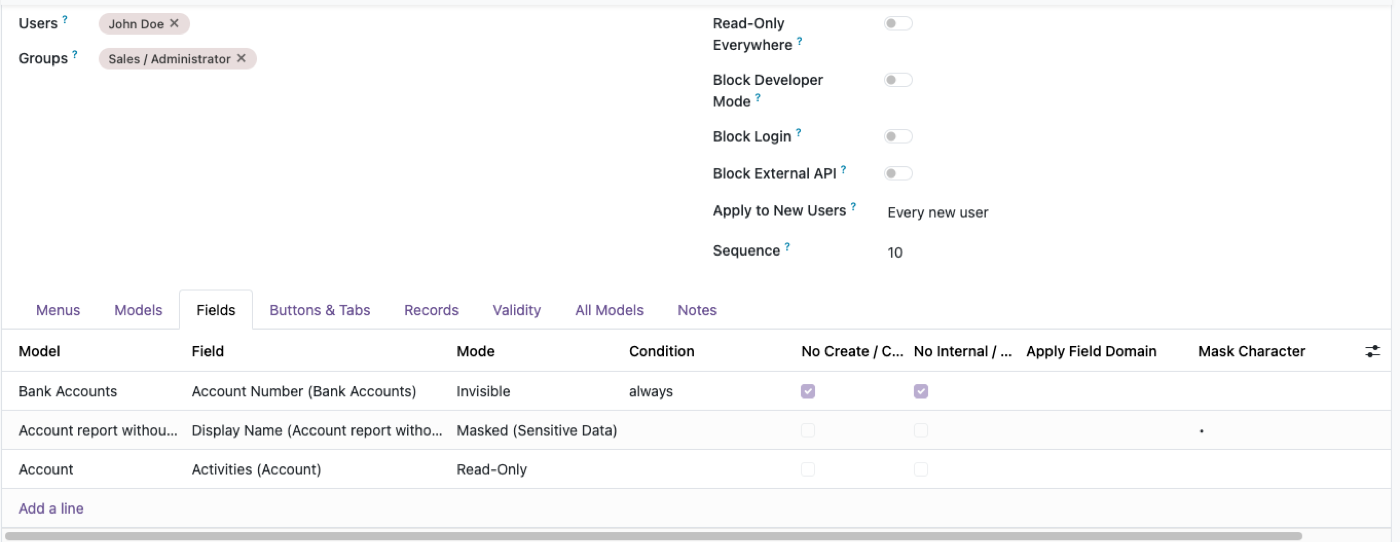
The four states, and when each one is right
Invisible
The field isn't sent. Use it when the existence of the data is itself sensitive, or when there's no legitimate reason for that role to know the field exists.
Typical case: cost price on a product form, for a sales team paid on revenue.
Read Only
The field is visible but can't be changed. Use it when people need the information to do their job and need to not be the ones changing it.
Typical case: credit limit on a customer, visible to sales so they understand a blocked order, editable only by finance.
Required
The field must be filled before saving — for that profile specifically. Use it when a data-quality rule applies to one team and not others.
Typical case: a source or campaign field that marketing must complete but that the warehouse should never be blocked by.
Masked
The field shows ••••••1234 instead of the real value, with the last few characters optionally visible. Use it when someone needs to match a value without being able to read it.
Typical case: the support agent confirming a customer's card ends in 1234, or an HR assistant matching a national ID, without either of them being able to read or export the whole number.
Masking is the one that's genuinely uncommon in Odoo access modules, and it's the reason this page exists. There's more on data masking in Odoo, including which field types it fits and where it doesn't help.
Does hiding a field actually stop someone reading it?
Yes — because it's enforced on the server, not in the interface.
This is the question worth pressing any access-control tool on, because plenty of them fail it. If a restriction is applied by modifying a view, then anything that isn't the view — a script hitting XML-RPC, an export, a JSON-RPC call, a report, a connected AI assistant — never sees the restriction at all. The button is gone; the data isn't.
Server-side enforcement means the restricted user gets the same refusal whichever door they come to. A hidden Delete button also means a refused delete request. An invisible field is invisible to read(), not just to the form.
If you want to close the programmatic route entirely for specific people, that's a separate switch: blocking the Odoo external API per user covers XML-RPC, JSON-RPC and API keys.
Can a field rule depend on something else?
Yes. Field permissions can be conditional — applying based on other values on the record — and dropdown options can be restricted so a profile only sees a subset of the available selections.
Conditional rules are where most real requirements land, because real requirements are rarely "hide this always." They're "hide the margin once the order is confirmed", or "make this read-only for records belonging to another company."
What field-level security doesn't do
Being precise about this saves support tickets and refunds:
- A hidden menu is not access control. Hiding a menu is a navigation convenience. If the data needs to be unreachable, use Model or Record rules — not a hidden menu, and not an invisible field on one form while the same field sits readable on another.
- It can only narrow, never widen. The effective permission is always the narrower of these rules and the user's own Odoo access rights. If someone can't reach the model at all, field rules on it are moot.
- Masking is a display and access control, not encryption. The value is still in the database. Anyone with database access has the value. Masking stops the wrong user reading it; it isn't a substitute for encryption at rest if that's your requirement.
- It doesn't cover fields on models the person can't reach anyway. Start at model level with Odoo user permissions, then narrow to fields.
- Native Odoo can't express any of this, which is worth understanding before you evaluate alternatives — Odoo security groups explains why field-level rules have to live in a layer above groups.
How it's set up
Field rules live inside an Access Profile — the product's role construct. A profile targets users, groups, or both, and new joiners matching a profile's criteria are enrolled from their first login, so the rule doesn't quietly stop applying the moment somebody new arrives.
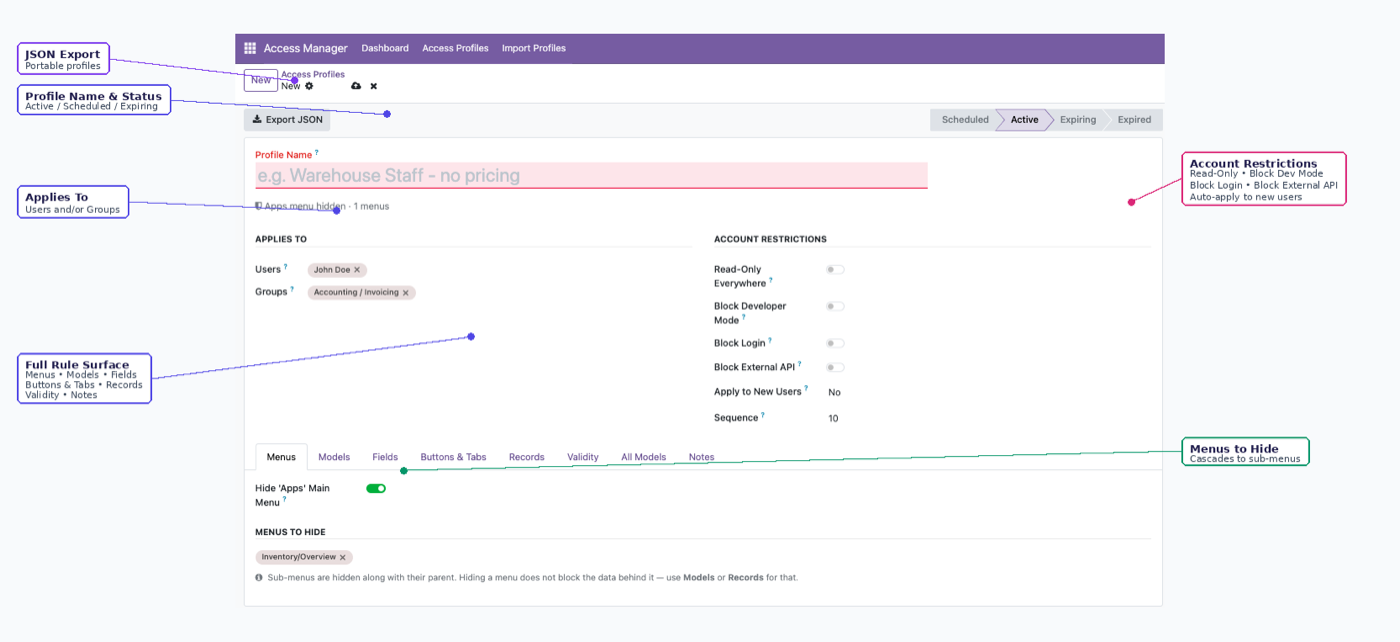
Profiles export as JSON and import into another database, which is how you move a field-security configuration from staging to production without rebuilding it by hand. Unresolved references on import are skipped and logged rather than guessed at. The full lifecycle picture — auto-enrolment, expiry, moving rules between environments — is in managing access rights in Odoo.
Administrators of the app are structurally exempt from the rules they create, so there's no way to make a field invisible to yourself and lose the ability to change it back.
$343. Once.
One-time purchase through the Odoo Apps Store. OPL-1 licence, Odoo 19, Community and Enterprise. No per-user fee.
- Invisible, read-only, required, masked, conditional, dropdown-restricted
- Enforced server-side — holds over XML-RPC, JSON-RPC and exports
- Masking shows
••••••1234for card numbers, IDs and bank details - Rules live in portable profiles you can move between databases
- Impossible to lock yourself out — admins are structurally exempt
Or get it free on an Odin deployment — every module we've built, installed, from $150/month with unlimited users.
FAQ
Can I hide a field from one user but not another in Odoo?
Yes. Field permissions are set per Access Profile, and a profile can target individual users, groups, or both.
Is the field actually hidden, or just not displayed?
Actually hidden. An invisible field is not sent to that user, including over the API — it isn't a CSS or view-attribute trick.
Can I show only the last four digits of a field?
Yes. Masked fields display ••••••1234 with the trailing characters optionally visible, which is the usual requirement for card numbers, national IDs and bank details.
Does this work over XML-RPC and JSON-RPC?
Yes. Enforcement is server-side, so a script gets the same restriction the interface does. You can also block a user's external API access entirely.
Do I need to write XML or Python?
No. Everything is configured in the interface. There's a custom XPath escape hatch for cases the presets don't name, and it's optional.
Does this replace Odoo's own access rights?
No — it layers on top. The effective permission is always the narrower of this app's rules and the user's own Odoo access rights.
What happens after I try the demo?
Buy it on the Odoo Apps Store and install it on your instance — or book a call and we'll set it up for you. The demo is shared, so please undo anything you change before you leave.
The rest of the cluster
Give people exactly enough access. No more.
Build a real profile and watch restrictions hold over the API.