Shopify payout reconciliation in Odoo.
A Shopify payout arrives in your bank as one net figure covering dozens or hundreds of orders, with processing fees already deducted and refunds already netted off. Matching that single number back to the invoices behind it is the job most connectors leave entirely to a person with a spreadsheet. This one decomposes the payout — charges, refunds, fees and adjustments broken out and matched line by line to the source orders and invoices.
Why a payout never matches your sales figure
If you've reconciled Shopify by hand you already know this. If you're evaluating connectors and haven't yet, it's the cost nobody quotes you.
One bank deposit contains:
- Charges — the gross value of orders captured in that settlement period
- Refunds — netted off, and frequently belonging to orders from a different period
- Processing fees — deducted per transaction, at rates that vary by card type and region
- Adjustments — chargebacks, chargeback reversals, corrections, currency conversion differences
So the deposit never equals your sales figure for the period, and it can't. It's a net of four different things spanning overlapping time ranges.
Without decomposition you get one bank line and a sales total that disagree by an amount you have to explain. The usual response is a suspense account, a monthly journal entry someone posts on faith, and an unexplained balance that grows slowly all year.
What decomposition actually gives you
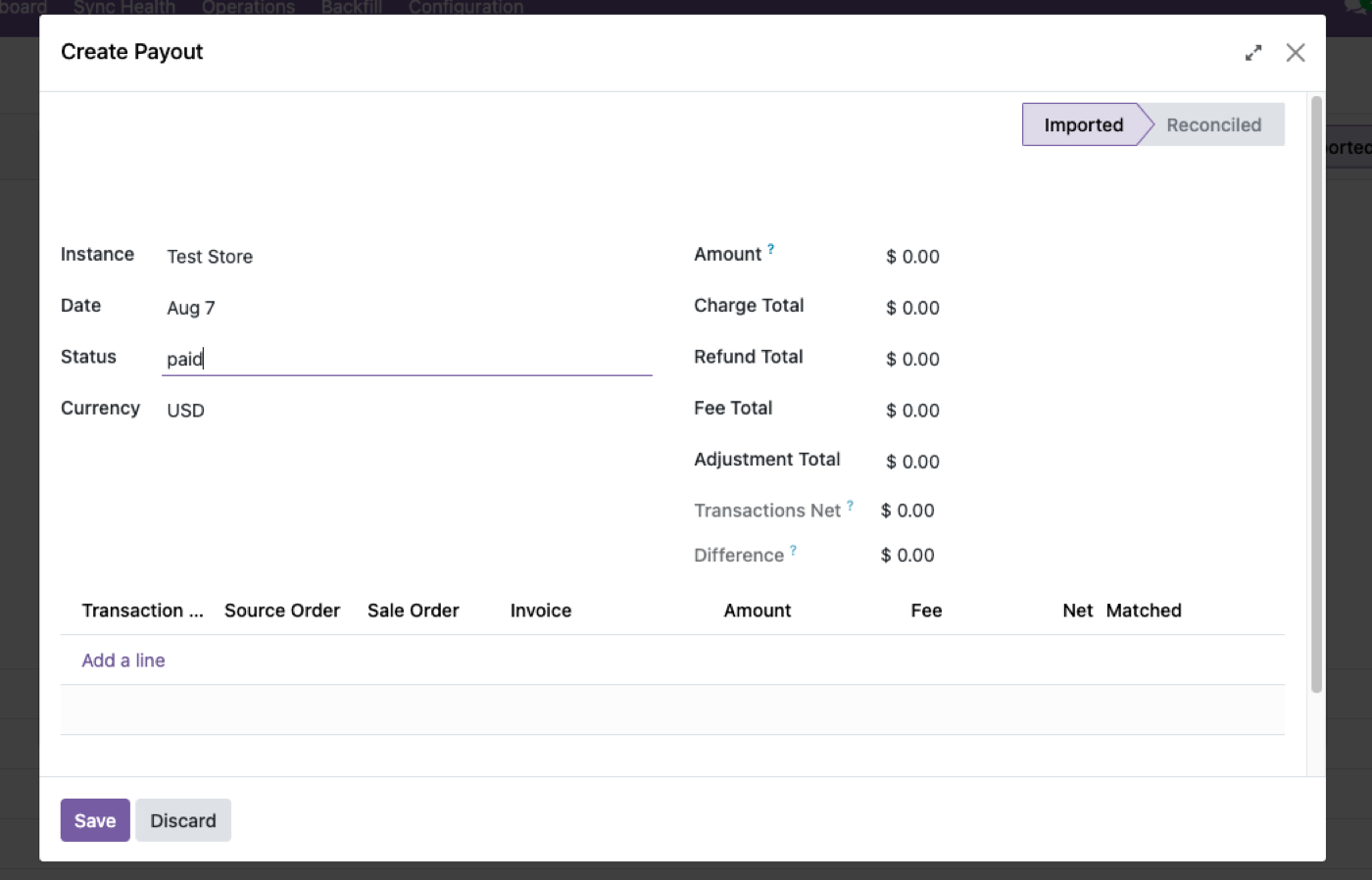
Payouts land as their own record in Odoo, with each component broken out and matched to the order and invoice behind it.
The practical difference at month-end:
Fees become a real expense line. Processing fees are a cost of sale, and they belong in the P&L against the revenue that generated them — not buried inside a net deposit where nobody can see what card processing actually costs. Most businesses running unreconciled payouts genuinely don't know this number.
Refunds land against the right order. Including refunds settled in a later period than the sale, which is the case that breaks manual reconciliation most often.
The bank line reconciles to something. One deposit, matched to a decomposed payout record, matched to invoices. No suspense account, no faith-based journal.
Discrepancies are visible immediately. A chargeback appears as a chargeback rather than as a small unexplained shortfall in a total.
The limit, stated up front
Payout reconciliation covers Shopify Payments only.
If most of your volume runs through PayPal, a local acquirer, a buy-now-pay-later provider or another gateway, those payouts are not decomposed here, and you'll still reconcile them the way you do now.
That's worth knowing before you buy rather than after. For a lot of merchants Shopify Payments is the overwhelming majority of volume and this covers effectively everything. For merchants in markets where Shopify Payments isn't available, or who run several gateways deliberately, the benefit is proportionally smaller.
Ask the same question of anyone else you evaluate — payout reconciliation is commonly implemented for one provider and described as though it covers all of them.
How it fits with the rest of the accounting flow
Payout reconciliation is the last step in a chain, and it only works if the earlier steps are right:
- Orders land as real Odoo sale orders, so invoices are ordinary Odoo invoices that ordinary Odoo reconciliation can match
- Tax is computed by whichever system you nominated — "Shopify amounts win" for cent-exact matching, or "Odoo computes" using your fiscal positions
- Refunds import as draft credit notes, reviewed and posted by a person
- Payouts decompose and match to the invoices from step 1
The dependency worth understanding: if orders arrived as a connector-specific record type rather than real sale orders, none of the rest works, because there's no ordinary invoice to reconcile against. That's why how Shopify orders sync into Odoo matters to a finance evaluation as much as an ops one.
A note on tax mode and reconciliation. If you've chosen "Odoo computes", your invoice totals will differ slightly from Shopify's, which means payout amounts won't tie exactly to invoice amounts. That's expected and correct — but decide it deliberately, and if cent-exact reconciliation is the priority, "Shopify amounts win" is the mode that gives it to you.
Questions to ask before month-end
Whatever you're running, these expose whether payouts are genuinely handled:
- Where do processing fees appear in my P&L? If the answer is "netted inside revenue," they're invisible.
- What happens to a refund settled in a later period than its sale? The most common source of a permanent unexplained difference.
- Can I see which orders a specific bank deposit paid for? If not, you're reconciling on trust.
- What happens to a chargeback? It should appear as an adjustment, not as a shortfall.
- Which payment providers are covered? Rarely all of them.
What this doesn't do
- Shopify Payments only. Other gateways aren't decomposed.
- It doesn't post to your ledger automatically. Consistent with refunds landing as drafts — reconciliation is prepared, a person approves it.
- It isn't a bank feed. Odoo's own bank statement import brings the deposit in; this gives it something to match against.
- It won't fix a tax-mode mismatch. If invoice totals differ from Shopify's by design, payouts won't tie exactly, and that's the configuration working as chosen.
- It doesn't reconcile historic payouts from before install unless you backfill that range.
Payout reconciliation ships as part of the Odoo Shopify connector rather than as a separate purchase. If you're comparing vendors on this specifically, it's check six in how to choose an Odoo Shopify connector — and worth asking every vendor which payment providers they actually cover.
$349. Once.
One-time purchase through the Odoo Apps Store. OPL-1, Odoo 19, Community and Enterprise. No per-order fee.
- Payouts land as their own record, decomposed
- Charges, refunds, fees and adjustments matched to source order and invoice
- Processing fees visible as a real cost, not netted inside revenue
- Refunds match back to their original sale across periods
- Shopify Payments — stated plainly, not implied to cover every gateway
Or get it free on an Odin deployment — from $150/month, unlimited users, every module included.
FAQ
How do I match Shopify payouts to invoices in Odoo?
Payouts import as their own record with charges, refunds, fees and adjustments broken out, each matched to the order and invoice behind it — so the bank deposit reconciles against real invoices rather than a suspense account.
Why doesn't my Shopify payout match my sales total?
Because a payout is a net figure: gross charges, minus refunds that may belong to earlier periods, minus per-transaction processing fees, plus or minus adjustments like chargebacks. It can't equal a period sales total.
Where do Shopify processing fees end up in Odoo?
Broken out as their own component of the payout, so they appear as a cost of sale rather than being netted invisibly inside revenue.
Does this work with PayPal or other gateways?
No. Payout reconciliation covers Shopify Payments only. Other providers' settlements aren't decomposed.
What happens to a refund that settles in a later period than the sale?
It's matched back to the original order and invoice rather than appearing as an unexplained difference in the later period.
Does it post the reconciliation automatically?
No. It prepares the match; a person reviews and posts. Consistent with refunds arriving as draft credit notes.
Can I reconcile payouts from before I installed it?
Only if you backfill that date range, which the resumable import supports.
The rest of the cluster
Stop reconciling Shopify by hand.
Open a payout record and follow it back to the invoices.