How Shopify orders and customers sync into Odoo.
Orders and customers import one way — Shopify to Odoo — and orders land as real Odoo sale orders, not as a parallel record type in a connector-specific model. That's the detail that decides whether the rest of your Odoo works afterwards: Sales Analysis, pivots, forecasting, commission reports and every custom view you've built all keep working, with no extra setup, because they're looking at the same object they always were.
Which system decides the tax?
This is the question that determines whether your accountant signs off, and almost nobody writes about it. There are two modes and they produce different numbers on purpose.
"Shopify amounts win" — Odoo records the totals Shopify calculated. Your Odoo figures match your Shopify reports to the cent. Choose this when Shopify is where tax is computed and you want the two systems to agree without reconciliation.
"Odoo computes" — Odoo applies your fiscal positions instead, and Shopify's tax lines are archived in a note on the order rather than discarded. Choose this when Odoo is your tax authority — typically because you have fiscal positions handling cross-border rules, exemptions or registrations that Shopify's tax engine doesn't model.
The trade-off is straightforward and worth stating plainly: mode one gives you matching reports and Shopify's tax logic. Mode two gives you your own tax logic and a small permanent difference between the two systems' totals that you'll need to explain at year end.
Neither is right in general. Ask your accountant which system they consider authoritative for tax, and set it to that. Then don't change it mid-year.
What arrives with an order
Orders import with the surrounding detail intact, not just lines and a total:
- Tax policy — as above
- Discounts — order-level and line-level
- Carrier mapping — Shopify shipping methods mapped to Odoo delivery carriers, so shipping cost and method land somewhere useful rather than as a mystery line
- Fraud flagging — Shopify's risk assessment travels with the order, so a flagged order is visible to whoever picks it rather than shipping quietly
That last one is small and worth having. The usual failure is that fraud signals live in Shopify's admin, warehouse staff work in Odoo, and nobody makes the connection until a chargeback arrives.
What happens to an order line that can't be matched?
It still lands — on a fallback product, with the reason written to the Mismatch Log.
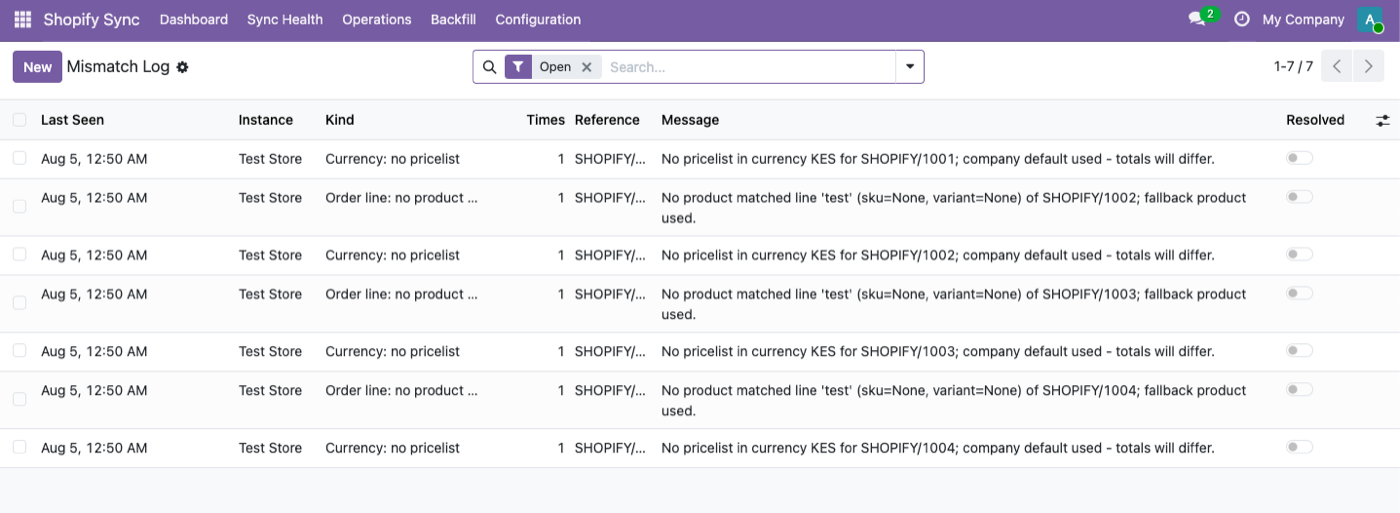
The alternative, which is what most connectors do, is to fail the whole order. Which means a customer has paid, your warehouse has no record of it, and you find out three weeks later when they email asking where it is.
The design decision here is that an order with one wrong line is more useful than no order at all. You get the revenue recorded, the customer record created, the fulfilment obligation visible — and a logged reason telling you exactly which line needs a human. Fix the mapping, and the fallback line is the only thing you touch.
Common causes: a product sold on Shopify that was never created in Odoo, a currency with no matching pricelist, a variant deleted in Shopify but still referenced by an older order, a bundle or custom line item with no SKU. Most of these trace back to the catalogue — see Odoo Shopify product and inventory sync. If orders are missing entirely rather than arriving with a bad line, that's a different cause: Shopify orders not syncing to Odoo.
Customers: import, with dedup that matters
Customers import from Shopify with email deduplication and address hierarchy preserved — so a customer with a billing address and three shipping addresses arrives as one partner with child addresses, not four unrelated contacts.
Email dedup is doing more work than it appears. Without it, a returning customer who checked out as a guest creates a second partner record, and within a year your customer count, your repeat-purchase rate and your CRM are all wrong in the same direction.
Marketing consent never leaves Shopify. This is deliberate and it's a compliance answer, not a feature gap. Shopify is where the customer gave or withheld consent, Shopify holds the audit trail of when and how, and copying a consent flag into a second system creates a second source of truth for the one field where having two is a legal problem. If you email from Odoo, consent stays a question you ask Shopify.
Fulfilments go the other way
Fulfilments export from Odoo to Shopify, over the FulfillmentOrders API — Shopify's current mechanism rather than the legacy one — with partial shipments supported.
Partial shipment support is the practical differentiator. A three-line order where two lines ship today and one is on backorder is completely normal, and a connector that can only mark an order wholly fulfilled forces the warehouse to either lie to the customer or work outside the system.
Tracking numbers travel with the fulfilment, so the customer gets Shopify's own shipping notification with a real tracking link, generated from the delivery you validated in Odoo.
Refunds land as drafts. Nothing auto-posts.
A Shopify refund imports as a draft credit note. It does not post to your accounts.
This is the correct behaviour and it's worth being explicit about why: a refund in Shopify is a commercial event, and posting to the ledger is an accounting event. Those are approved by different people, sometimes on different days, occasionally in a different period. A connector that posts automatically has made an accounting decision on your finance team's behalf, in your name, without asking.
Draft means someone reviews it and posts it. That's a few seconds of work and it keeps the ledger something a human owns.
The money side of this — matching Shopify's payouts to the orders behind them — is Shopify payout reconciliation in Odoo.
Edits after delivery
Shopify orders get edited after the fact — a customer adds an item, support removes a line, someone corrects a quantity.
Un-delivered quantity changes apply automatically. Nothing to do.
Anything touching a delivered line creates a review activity for a human. It does not apply silently.
That distinction is the whole policy. Silently editing a delivered order line changes what your books say you shipped after you shipped it, which is the kind of quiet inconsistency that surfaces during an audit rather than during the week it happened.
What this doesn't do
- Orders import one way. Orders created in Odoo don't appear in Shopify. If you need that, it's a different requirement worth discussing before you buy.
- It doesn't push customers to Shopify. Import only, so an Odoo-created contact stays in Odoo.
- It doesn't manage marketing consent. By design — consent stays in Shopify.
- It won't fix product mapping for you. Unmatched lines land on a fallback with a reason; connecting them to the right product is a human decision.
- Draft credit notes need posting. That's the point, but it does mean somebody owns the task.
Everything above is part of the Odoo Shopify connector — one module, one price, no per-order fee.
$349. Once.
One-time purchase through the Odoo Apps Store. OPL-1, Odoo 19, Community and Enterprise. No per-order fee.
- Orders land as real Odoo sale orders — every existing report just works
- Two tax modes: match Shopify to the cent, or apply your fiscal positions
- Carrier mapping, discounts and Shopify fraud flags travel with the order
- Unmatched lines land on a fallback with a logged reason — never dropped
- Fulfilments export via FulfillmentOrders with partial shipments and tracking
- Refunds import as draft credit notes — nothing auto-posts
Or get it free on an Odin deployment — from $150/month, unlimited users.
FAQ
Do Shopify orders become real Odoo sale orders?
Yes. They land as standard sale orders, so Sales Analysis, pivots and any existing reports or custom views work with no extra configuration.
Will my Odoo totals match Shopify exactly?
In "Shopify amounts win" mode, to the cent. In "Odoo computes" mode your fiscal positions apply instead, and Shopify's tax lines are archived in a note on the order.
What happens to an order line that doesn't match a product?
It lands on a fallback product with the reason written to the Mismatch Log. The order is never rejected and nothing is silently dropped.
Are duplicate customers created for guest checkouts?
No — customers import with email deduplication, and address hierarchy is preserved so multiple addresses attach to one partner.
Does marketing consent sync to Odoo?
No, deliberately. Consent stays in Shopify, where it was given and where the audit trail lives.
How are refunds handled?
They import as a draft credit note. Nothing posts to your accounts automatically.
What happens if someone edits a Shopify order after it shipped?
Un-delivered quantity changes apply automatically. Anything touching a delivered line creates a review activity for a human instead of applying silently.
Can I send partial shipments?
Yes. Fulfilments export through the FulfillmentOrders API with partial shipments and tracking numbers.
The rest of the cluster
Stop reconciling Shopify by hand.
Import an order, break a product mapping, watch it land anyway.