How to prevent deletion of records in Odoo
Turn off the Delete switch for the model on the relevant Access Profile. Keep Archive on if you still want people to be able to remove a record from active views without permanently destroying it — the two are separate switches on purpose, since "can't see it anymore" and "gone forever" are very different risk levels.
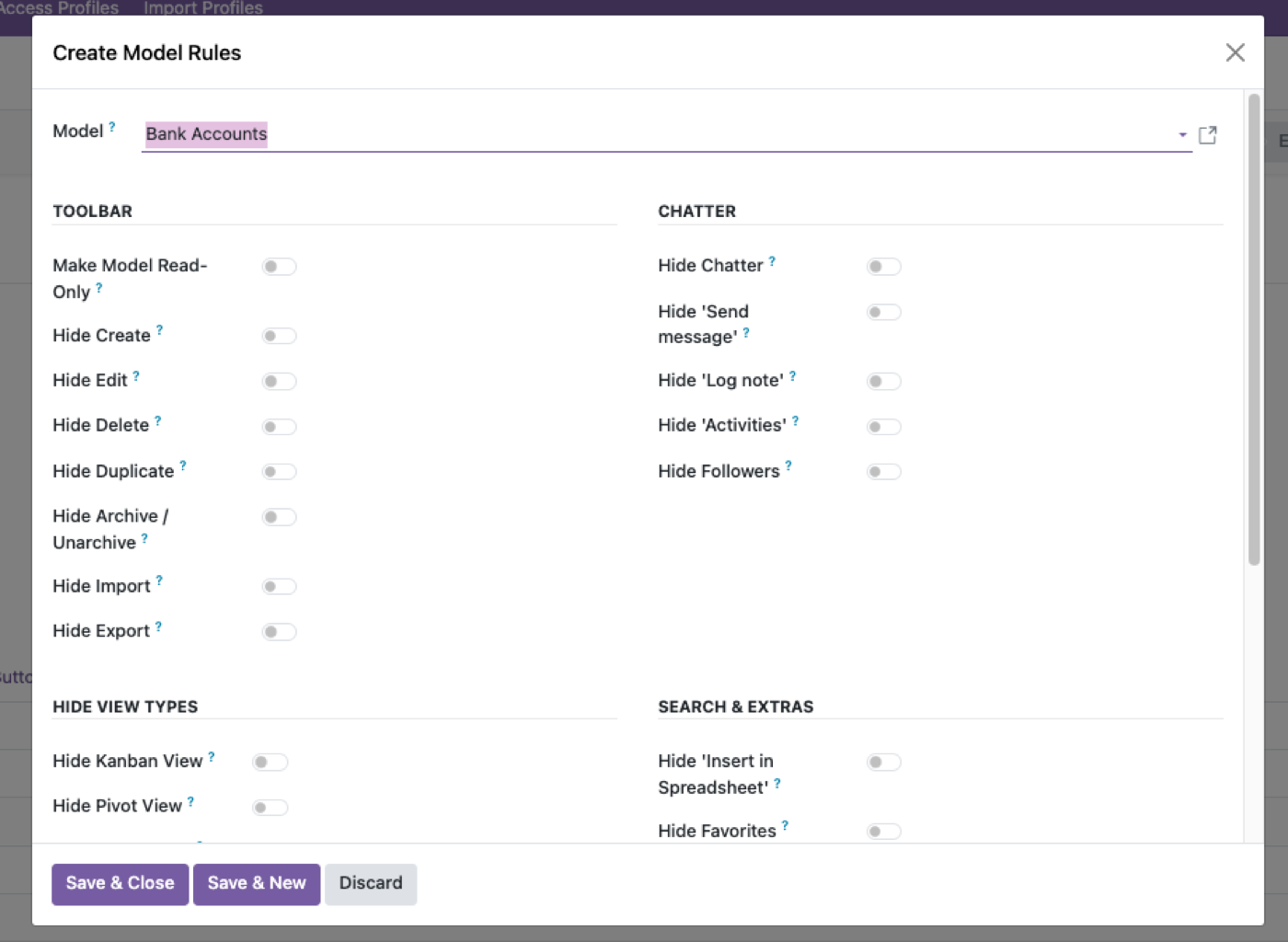
Turn off Delete
Blocks permanent removal at the model level, enforced server-side.
Decide on Archive separately
Leave it on if a soft-delete workflow is still useful for that group; turn it off too if records should never even leave active view.
Apply per profile, not globally
Admins and a small ops team might keep Delete; most other profiles don't need it.
Delete and archive are different risks
Odoo’s unlink is permanent for that record (plus cascade surprises). Archive sets active=False so the document drops out of default views. Most “don’t let them delete” requests are really “don’t let them destroy the audit trail.” Turn off Delete; leave Archive on if a soft-delete workflow is still useful. Access Manager Pro splits those switches on purpose.
Native groups often bundle unlink with write. That is why a salesperson who should only cancel a quotation can still unlink it. Access rights on unlink are the real control, including over the API.
Some documents should not be deletable even for admins
Posted journal entries, done stock moves, and paid invoices have native locks. Do not replace those with a profile tweak and then grant unlink to “fix a mistake.” Use reversal, credit notes, and inventory adjustments. The profile is for people who should never have been able to unlink a draft in the first place.
Chatter and attachments can still hold the story after archive. Unlink takes that away. If the request came from a GDPR erasure, that is a different process than “shop floor should not delete products.”
A short list of who should still unlink
A small ops or data-quality role, on staging first, on models without legal retention. Not every manager. Not the MCP bot user. Combine with prevent editing when the risk is changing posted data rather than removing the row.
Test as that user: the Delete action in the UI, a server action, and an API unlink. Three doors.
The rest of the cluster
Before you set it up
Is Archive the same as Delete?
No. Archive hides the record from active views; Delete removes it. Keep Archive on if you want a soft-delete path without permanent destruction.
Does turning off Delete in a group stop unlink over the API?
If it is a real access right on unlink, yes. A hidden button is not enough.
Who should still be allowed to delete?
Usually a small ops or admin profile, not every user who can edit. Access rights management.
Ready to lock this down?
Try it on the live sandbox first — nothing to install.