Managing access rights in Odoo.
Access rights in Odoo aren't hard to set. They're hard to keep set. A group added for a one-off task in 2023, a record rule loosened during implementation and never tightened, a contractor who finished in March and can still log in — none of that is a configuration problem, it's a lifecycle problem, and native Odoo gives you almost nothing for it. Access Manager Pro adds the missing half: reusable profiles, automatic enrolment, expiry dates, and a way to see what any given person can actually do.
Why access rights rot
Three mechanisms, and every Odoo instance over about two years old has all three.
Permissions are granted under time pressure and revoked never. Someone needs to do a thing today. The fastest route is adding them to a group. The group stays.
Nobody can see the current state. Native Odoo can tell you which groups a user is in. Working out what that means — which models, which records, which fields, in combination — is a job nobody does voluntarily. So drift is invisible until an incident makes it visible.
Rules are attached to people, not roles. When the person changes job, the rules don't. When a new person arrives to do the old job, someone reconstructs the setup from memory, usually by copying the nearest existing user — which propagates every accumulated extra along with it. The structural reason this happens is that native Odoo security groups are additive: joining a group can only ever widen access, never narrow it.
Access Profiles: the fix for all three
A profile is a named, reusable set of rules — model permissions, field permissions, record rules and session controls together. It targets users, groups, or both.
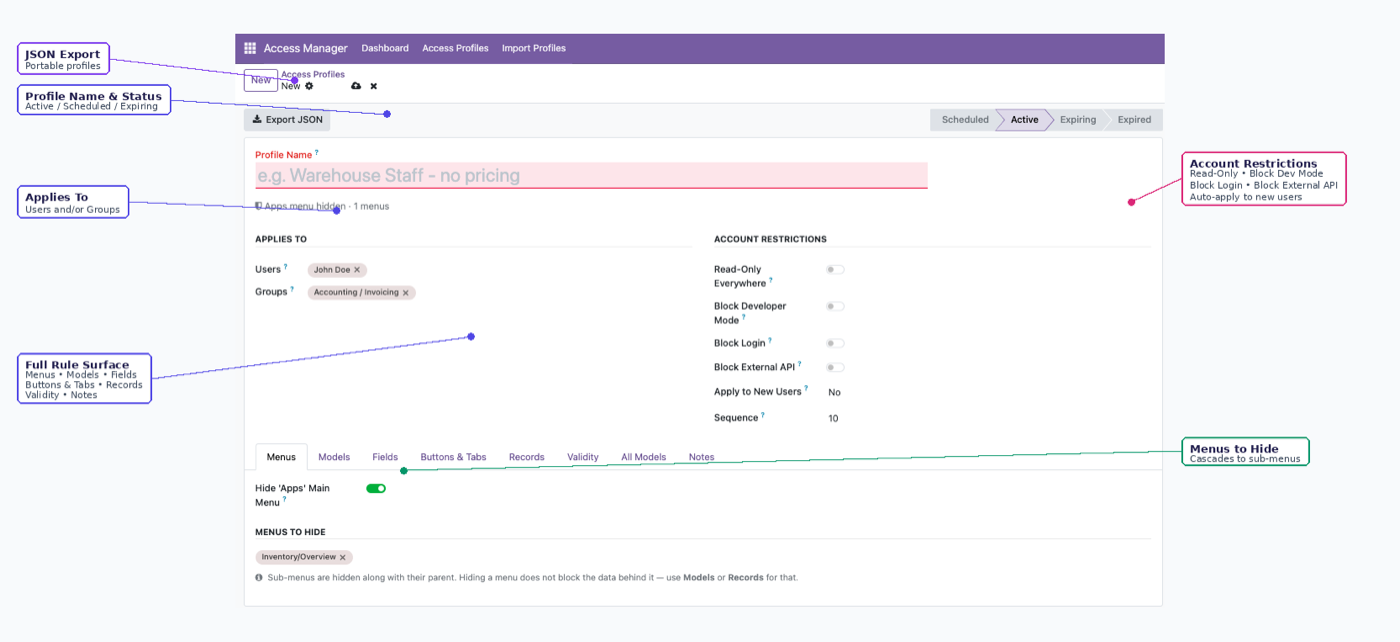
One profile holds every layer of restriction, so the rules travel together instead of being reassembled per person.
The property that stops the rot: new joiners matching a profile's criteria are enrolled from their first login. You write the rule once, describing the job rather than the person, and it keeps applying to whoever holds that job in November. Nobody has to remember.
This is also why copying an existing user is the wrong pattern and profiles are the right one. Copying propagates accumulated exceptions. A profile propagates the intended state.
Seeing what people can actually do
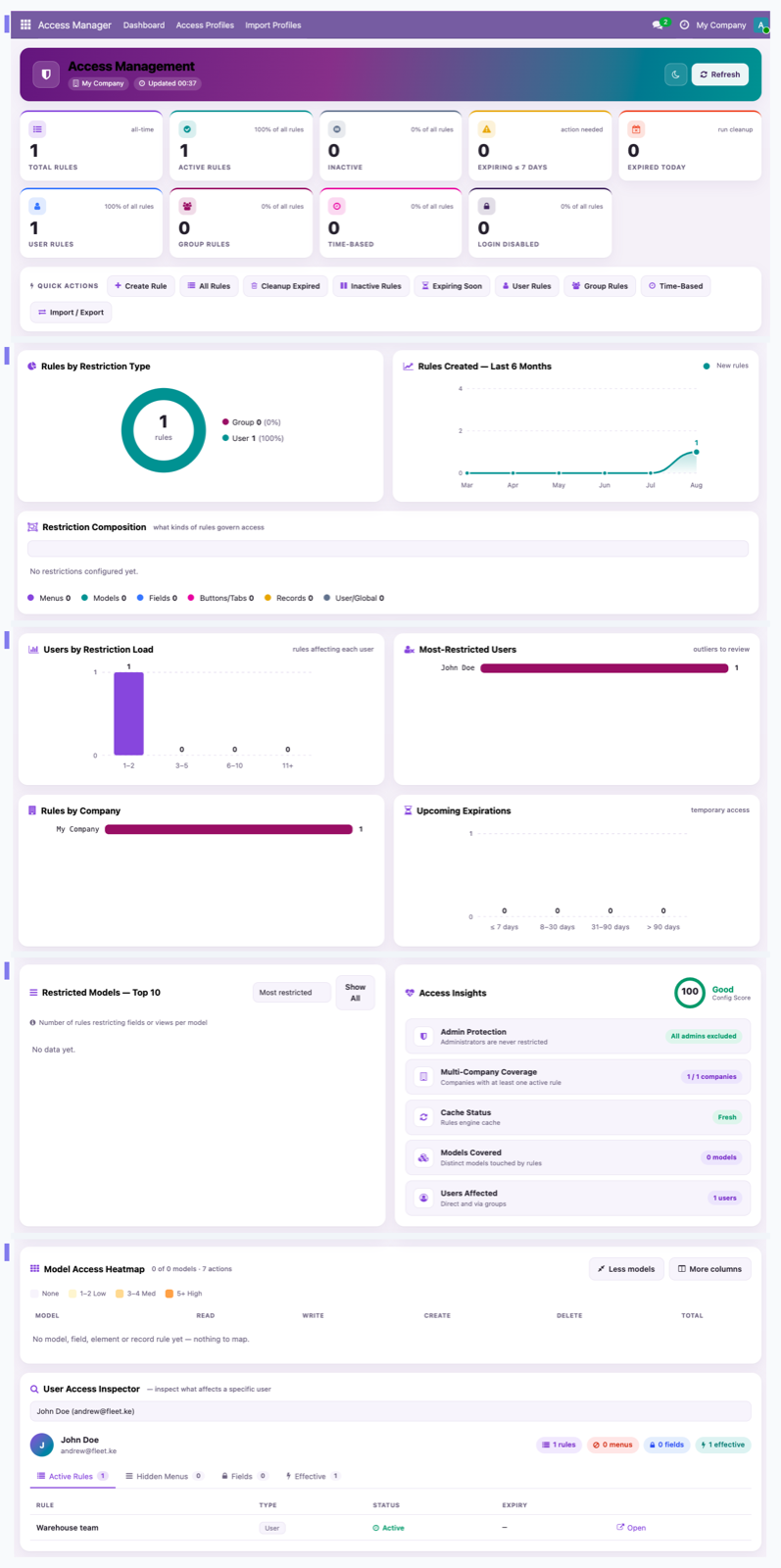
There's a dashboard showing active profiles, expiring access and the most-restricted users, plus a per-user inspector that answers the question audits always start with: what can this specific person do, right now, in total?
That question is genuinely hard to answer in stock Odoo, which is why it usually gets answered with "I think so." Being able to answer it precisely is most of what "managing access rights" means in practice.
If what you actually need is narrower — one person, one thing they shouldn't be doing — Odoo user permissions is the task-level version of this page. If you're designing the whole structure, start with role-based access control in Odoo.
Access that expires on its own
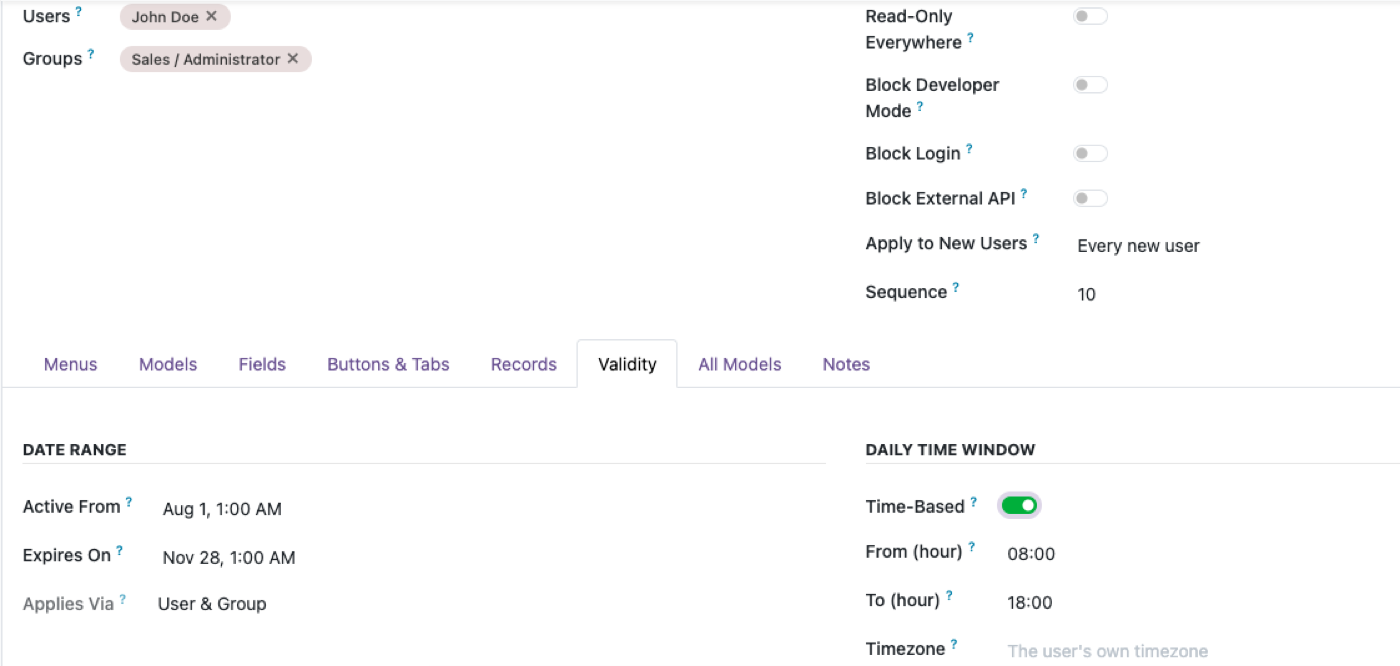
Time-boxed access starts on a date, expires on another, and can be limited to a daily window.
That covers the whole category of access that should have been temporary and wasn't: contractors, auditors, the consultant with two weeks of work, maternity cover, a support engineer who needs production access for one afternoon. Every one of those normally depends on somebody remembering to revoke it, and the accumulated failures of that step are what a security review actually finds.
The daily-window option is narrower and occasionally exactly right — a night-shift supervisor whose access is meaningless at 2pm, a third-party bookkeeper who works Tuesdays.
Alongside it, per person rather than per model: read-only user, disable login without deleting the account and its history, disable developer mode, and blocking the Odoo external API per user — XML-RPC, JSON-RPC and API keys.
Moving rules between databases
Profiles export as JSON and import into another database.
That's how a permission configuration gets from staging to production without being rebuilt by hand — and rebuilding by hand is how staging and production quietly diverge, which is how a rule tested in staging turns out not to exist in production.
On import, unresolved references are skipped and logged, not guessed at. If a profile references a model or field the target database doesn't have, you get a log line rather than a silently different permission set. That's the correct behaviour and it's worth checking whether anything else you're evaluating does the same, because guessing here fails in the direction of granting access.
It also gives you version control of a sort: a profile is a file, so it can live in a repository and be diffed.
What this doesn't do
- It doesn't replace Odoo's groups. Profiles layer on top. The effective permission is always the narrower of the profile's rules and the user's own Odoo access rights, so this can only ever take access away.
- A hidden menu is not access control. Hiding a menu is navigation tidying. To actually block data, use model or record rules. The product says this on its own page and it's worth repeating.
- It won't decide policy for you. It enforces and maintains the decision. Deciding who should have what is still the hard half, and it's yours.
- It can't retroactively find what people saw. It controls access from now on. If you need a history of who accessed what, that's a different requirement.
Where to start on an existing instance
If you're inheriting an Odoo that's never had this looked at:
- Inspect three users at different levels and list what each can actually reach. Assume it's more than expected — it usually is.
- Check aggregates, not just lists. Open a pivot as a restricted user and see whether the total respects the restriction. This is the most common real leak, and multi-company access control in Odoo covers how to test it properly.
- Write profiles for jobs, not people. Three or four broad ones beat twenty specific ones.
- Time-box everything temporary on the way in, not on the way out.
- Export the profiles as JSON once they're right, so the configuration exists somewhere other than one database.
$343. Once.
One-time purchase through the Odoo Apps Store. OPL-1, Odoo 19, Community and Enterprise. No per-user fee.
- Reusable Access Profiles targeting users, groups or both
- New joiners auto-enrolled from their first login
- Time-boxed access with optional daily windows
- JSON export/import — unresolved references logged, never guessed
- Dashboard and per-user inspector, so the current state is visible
- Admins structurally exempt — you can't lock yourself out
Or get it free on an Odin deployment — every module we've built, installed, from $150/month with unlimited users.
FAQ
How do I manage access rights in Odoo without a developer?
Use Access Profiles: named, reusable rule sets built in the interface, covering model permissions, field permissions, record rules and session controls together. No XML, no Python.
What happens when someone new joins?
If they match a profile's criteria, they're enrolled automatically from their first login — the rule doesn't need reapplying for each new person.
Can I give someone access for a limited period?
Yes. Time-boxed access starts on a date, expires on another, and can be restricted to a daily window.
How do I move access rules from staging to production?
Export the profile as JSON and import it. References the target database can't resolve are skipped and written to a log rather than guessed at.
Can I see everything one user is allowed to do?
Yes — there's a per-user access inspector, plus a dashboard covering active profiles, expiring access and the most-restricted users.
Does this replace Odoo's native access rights?
No. It layers on top, and can only narrow. The effective permission is always the narrower of this app's rules and the user's own Odoo rights.
What happens after I try the demo?
Buy it on the Odoo Apps Store and install it on your instance — or book a call and we'll set it up for you. It's a shared demo, so please undo your changes before you leave.
The rest of the cluster
Give people exactly enough access. No more.
Build a real profile and watch restrictions hold over the API.