Data masking in Odoo.
Masking shows ••••••1234 where the real value would be. The person can confirm a match; they can't read, copy or export the number. Odoo has no native way to do this — you either show a field or you don't — and "or you don't" fails the very common case where somebody genuinely needs to verify a value as part of their job.
The case masking exists for
A customer calls. The agent needs to confirm they're speaking to the right person, so they ask for the last four digits of the card on file. The agent needs to see ••••••1234 and nothing more.
Hide the field entirely and the agent can't do their job. Show it and every support agent can read, copy and export every card number you hold. Neither is acceptable, and the gap between them is where most real privacy requirements live:
- Card numbers — verify the last four, never see the rest
- National IDs and tax numbers — match against a document, don't retain
- Bank account details — confirm which account a payment came from
- Salary and personal data on employee records — visible to HR, masked to line managers who need the record for other reasons
The requirement is almost never "nobody can see this." It's "these people can match it, those people can read it, and the boundary has to hold."
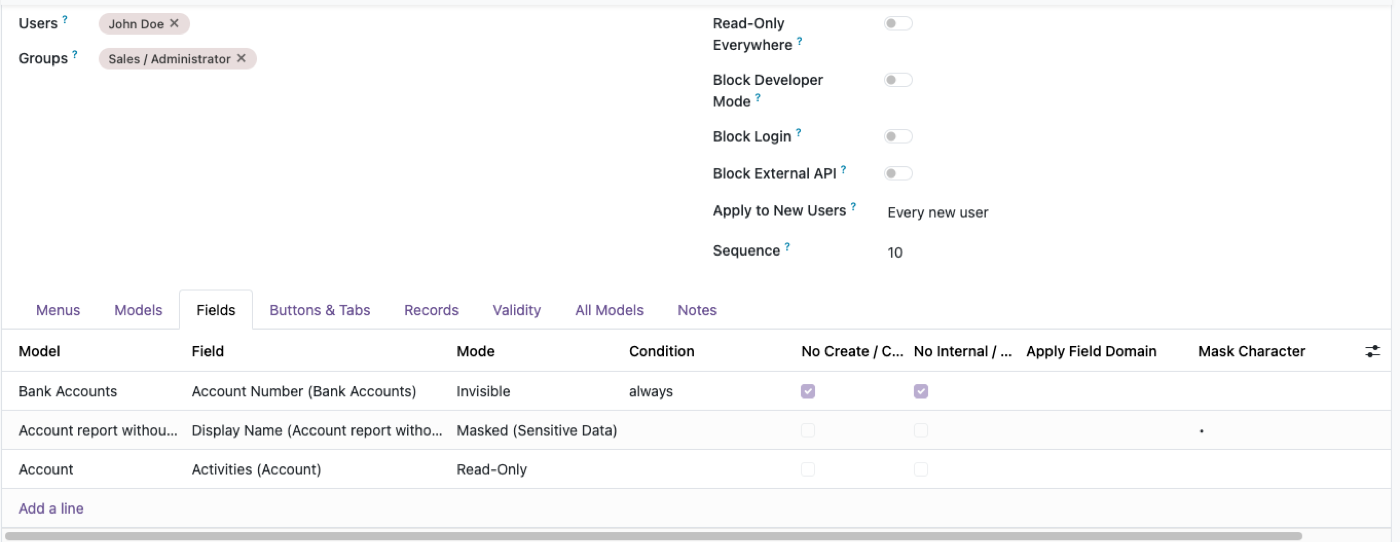
Masking is one of the field states, set per Access Profile — alongside invisible, read-only, required and conditional.
How masking works here
Point at a field, set it to Masked on the relevant Access Profile, and choose how many trailing characters stay visible.
The masked value is what that user receives. It isn't the real value hidden with CSS, and it isn't the real value with a display filter over it — the underlying data does not reach that user's session. Which matters, because a masked value implemented in the interface is not masked at all to an export, a report, a JSON-RPC call, or a connected AI assistant.
Enforcement is server-side. The restriction holds over XML-RPC and JSON-RPC as well as the web client. If you want to close the programmatic route entirely for a given person, that's a separate switch: blocking the Odoo external API per user.
Masking is not encryption. Say this out loud.
The honest limit, because getting this wrong is worse than not masking at all:
Masking is an access control, not a cryptographic one. The real value is still in the database, in plaintext, exactly as Odoo stored it. Anyone with database access — a DBA, a backup file, a restored dump on a developer's laptop — has the value.
So masking answers "can this user read this field?" It does not answer "is this data protected at rest?" If your requirement is the second one, masking is a component of the answer and not the answer.
Where that distinction bites in practice:
- Database backups contain the real values. Backup handling is a separate control.
- A restored production copy on a staging server is unmasked to anyone who can reach staging. If you restore production data into a lower environment, the masking configuration comes with it — but so does everyone's staging access.
- PCI-DSS and similar standards have specific requirements about storage, not only display. Masking helps with the display requirement. It doesn't make you compliant, and no module does.
We'd rather say that than let you find it in an audit.
Choosing between masked, invisible and read-only
| Requirement | Setting |
|---|---|
| They need to match the value but not read it | Masked |
| They shouldn't know the value exists | Invisible |
| They need to read it but never change it | Read Only |
| It depends on the record's state | Conditional |
| They may only pick from some options | Dropdown restriction |
The mistake worth avoiding: reaching for Invisible when Masked is what's needed. Invisible fields create workarounds — someone emails a colleague to ask for the number, and now the value is in an inbox. Masking removes the reason to ask.
The full set of field states, and when each is right, is on field-level security in Odoo.
Where masking sits in a wider configuration
Masking one field rarely stands alone. The usual complete answer:
- Model permissions so the person can only reach the models their job needs — Odoo user permissions
- Masking on the specific sensitive fields
- Export off on those models, so a permitted read doesn't become a spreadsheet
- API blocked for that user, so the interface restriction isn't routed around
- Time-boxed access if the need is temporary
Steps 3 and 4 are the ones people skip, and skipping them is what turns a masking policy into a masking gesture.
$343. Once.
One-time purchase through the Odoo Apps Store. OPL-1, Odoo 19, Community and Enterprise. No per-user fee.
••••••1234masking with configurable trailing characters- Enforced server-side — holds over XML-RPC, JSON-RPC and exports
- Set per Access Profile, targeting users, groups or both
- Sits alongside invisible, read-only, required and conditional field states
- Rules export as JSON and move between databases
Or get it free on an Odin deployment — from $150/month, unlimited users.
FAQ
How do I mask a field in Odoo?
Set that field to Masked on the relevant Access Profile and choose how many trailing characters remain visible. It's configured in the interface — no code.
Can I show only the last four digits?
Yes. That's the standard configuration for card numbers, national IDs and bank details.
Is masking the same as encryption?
No. Masking controls what a user can read. The real value remains in the database in plaintext, so anyone with database or backup access still has it. Masking is not a substitute for encryption at rest.
Does masking hold over the API?
Yes — it's enforced server-side, so XML-RPC and JSON-RPC calls receive the masked value. You can also block a user's external API access entirely.
Does Odoo have data masking built in?
No. Native Odoo lets you show or hide a field; there's no intermediate state where a value can be matched but not read.
Will masked fields appear masked in exports and reports?
Yes for that user, because the real value never reaches their session. A user with unmasked access to the field exports the real value, as they should.
What happens after I try the demo?
Buy it on the Odoo Apps Store and install it on your instance — or book a call and we'll set it up for you. Please undo any changes on the shared demo before you leave.
The rest of the cluster
Let people match a value without reading it.
Mask a real field and watch it hold.