Authorization in Odoo.
Authentication is who you are. Authorization is what you're allowed to do once you're in — and in most Odoo deployments the second one is enforced in a layer a determined user can walk around. Hidden buttons, hidden menus and hidden fields are interface decisions. Odoo's external API doesn't render the interface. Anyone with a login and ten minutes can call XML-RPC or JSON-RPC directly and get whatever the underlying permissions allow, regardless of what the screen showed them.
The distinction that matters
Authentication — proving identity. Odoo handles it: passwords, 2FA, SSO, OAuth.
Authorization — deciding what that identity may do. Odoo handles this with access rights and record rules at the ORM level, which is genuinely server-side and genuinely holds.
The gap is everything configured above the ORM. A groups= attribute on a menu. A field hidden by view inheritance. A button removed in XML. These are real and useful, and none of them are authorization — they're presentation. They vanish the moment a request doesn't come through the web client.
So the practical test for any Odoo restriction is one question: is this enforced where the data is, or where the screen is?
Why the API route is the one that gets missed
Every internal Odoo user can reach the external API by default. Not a bug — it's how integrations, scripts and reporting tools connect, and most businesses need it for something.
The consequence is that a user with legitimately restricted UI access can:
- Read models whose menus were hidden from them
- Read fields removed from their view
- Export data through a
search_readwhen the export button was taken away - Write to records the form wouldn't let them edit, if write access exists at the model level
None of that requires anything exotic. It requires their own username and password, and a scripting language.
And API keys make it durable. An Odoo API key created by a user keeps working after a password change, and often long after anybody remembers it exists.
What to actually do about it
Two layers, and you want both.
1. Get the permissions right at the ORM level
If a restriction is expressed as model permissions, record rules or field permissions, it's enforced where the data is — so it applies identically to the web client, the API, exports and reports.
That's the whole point of server-side enforcement: a hidden Delete button also means a refused delete request. Field-level security in Odoo covers doing this at field granularity, including masking a value so it can be matched but not read.
2. Close the API route for people who don't need it
Most staff never call the API. For them it's pure attack surface, and it can be switched off per user — XML-RPC, JSON-RPC and API keys together.
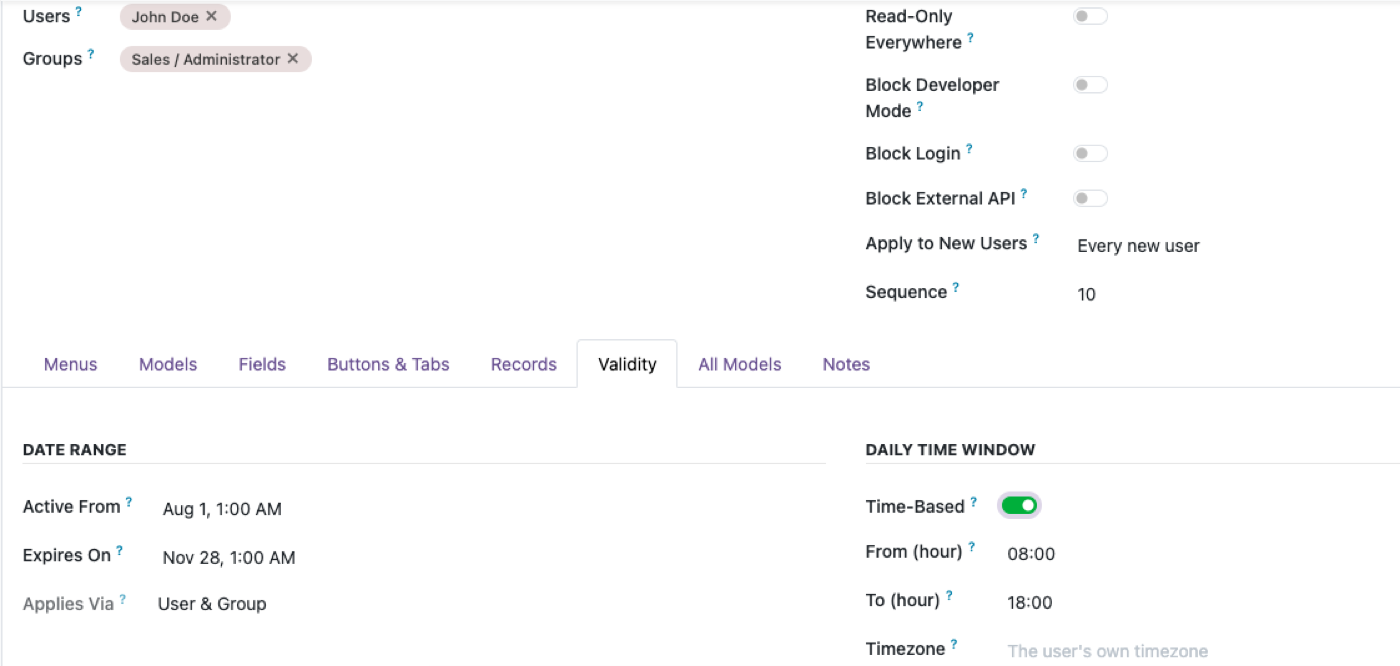
Alongside it, in the same place, per person rather than per model:
- Read-only user — one switch, everything becomes look-don't-touch
- Disable login — keep the user and their record history, remove the access
- Disable developer mode — which otherwise routes around a surprising amount of interface-level restriction
- Time-boxed access — starts on a date, expires on another, optionally only within a daily window
Administrators of the app are structurally exempt from these rules, so there's no configuration that locks you out of undoing it.
A worked example
Requirement: "Support agents can look up customers, but must not be able to extract the customer list."
The interface-only answer is to remove the Export button. That takes about a minute and achieves nothing, because the agent can search_read res.partner and get the whole list as JSON.
The complete answer is four settings:
- Export off on
res.partnerfor that profile — the obvious route closed - Field permissions masking or hiding email and phone, so a permitted read carries less — see field-level security
- API blocked for those users — the non-obvious route closed
- Record rules limiting which partners they reach at all, if the business allows it
One and two are common. Three is the one that turns a speed bump into a boundary, and it's the one most configurations don't have.
The AI question, since it's the same question
Connecting an AI assistant to Odoo is an authorization question wearing new clothes. The thing to ask isn't "is the AI safe" — it's whose permissions does a query execute with?
If the answer is a shared integration account, the AI is an unrestricted API client with a friendly interface, and every restriction above the ORM is irrelevant to it. If the answer is the real signed-in user, the AI is bounded by exactly the authorization you've already configured — which is why getting the ORM layer right is the prerequisite, not an afterthought. What an AI assistant can reach in Odoo goes through it.
What this doesn't do
- It isn't authentication. No SSO, no 2FA, no password policy. Odoo handles those.
- It can't grant. Rules only narrow. The effective permission is always the narrower of these rules and the user's own Odoo access rights.
- It doesn't stop a legitimate user misusing legitimate access. Someone allowed to read the customer list can read it. That's a policy and HR question.
- Blocking the API doesn't block the web client. It's a per-user switch on programmatic access only — they can still log in and work.
$343. Once.
One-time purchase through the Odoo Apps Store. OPL-1, Odoo 19, Community and Enterprise. No per-user fee.
- Block XML-RPC, JSON-RPC and API keys per user
- Restrictions enforced server-side — not a UI trick a script routes around
- Read-only user, disable login, disable developer mode, time-boxed access
- Nine per-model switches including Export, Duplicate, Archive and Reports
- Admins structurally exempt — no accidental lockout
Or get it free on an Odin deployment — from $150/month, unlimited users.
FAQ
What's the difference between authentication and authorization in Odoo?
Authentication proves who a user is — passwords, 2FA, SSO. Authorization decides what they may do once authenticated, through access rights, record rules and field permissions at the ORM level.
Can I block a user from Odoo's external API?
Yes — XML-RPC, JSON-RPC and API keys can be blocked per user, while leaving normal web login working.
Can a user bypass hidden menus and fields using the API?
Yes, if the restriction was only in the interface. Hidden menus and view-level field restrictions are presentation, not authorization. Only restrictions enforced at the ORM level hold against a direct API call.
Do Odoo API keys stop working when a password changes?
No. An API key keeps working independently of the password, which is why blocking API access per user matters more than it first appears.
Does removing the Export button stop someone extracting data?
Not on its own. A user who can read the model can retrieve the same records over the API. Export control needs API blocking alongside it.
Can I make a user read-only across all of Odoo?
Yes — a single per-user switch makes everything look-don't-touch, without editing any group.
What happens after I try the demo?
Buy it on the Odoo Apps Store and install it — or book a call and we'll set it up. Please undo changes on the shared demo before leaving.
The rest of the cluster
Enforce it where the data is, not where the screen is.
Block API access for a test user and try to route around it.