Syncing products, inventory and prices between Odoo and Shopify.
Three different things, syncing three different ways, and conflating them is where most integration pain starts. Products sync two-way. Inventory exports, with two-way optional, across multiple locations. Prices export, per store. Knowing which direction each one moves — and what happens when both sides change at once — is most of what you need to configure this correctly the first time.
Which direction does each thing move?
| Entity | Direction | What travels |
|---|---|---|
| Products | Two-way | Multi-variant, images, status, SKU, barcode, weight, HS code |
| Inventory | Export (two-way optional) | Multi-location: Shopify locations ↔ Odoo warehouses |
| Prices | Export | Pricelist per store, optional compare-at mapping |
Direction and conflict policy are set per entity — nothing is decided behind the scenes. Full product detail is on the Odoo Shopify connector page.
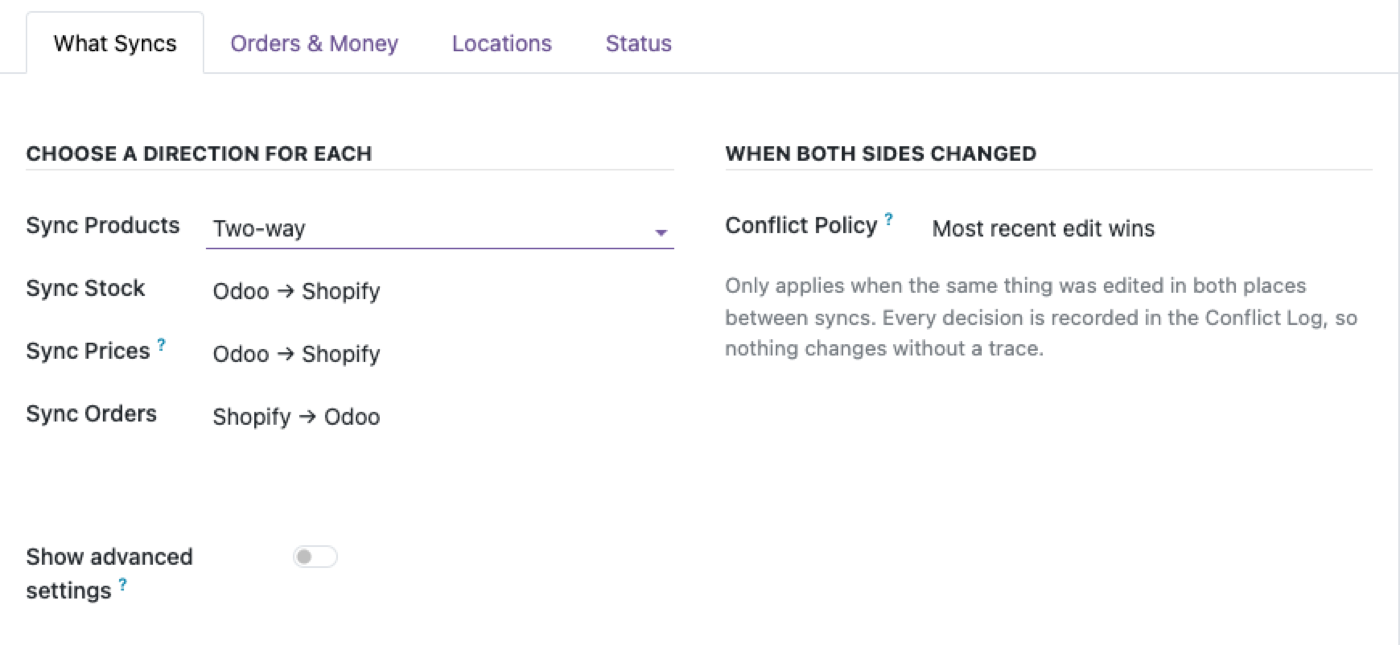
Products: two-way, which means conflicts are real
Product sync runs in both directions, which is what people want and also the only one of the three where two systems can genuinely disagree about the same field at the same time.
What syncs: multi-variant structure, images, status, SKU, barcode, weight and HS code. Variants map as variants rather than being flattened into separate products, which matters more than it sounds — a flattened variant structure is close to unrecoverable once you have order history attached to it.
What happens when both sides edit the same product?
Your chosen conflict policy decides, and the decision is written to the Conflict Log.
Three options: Odoo wins, Shopify wins, or newest edit wins. Set per entity, not globally, so products can behave differently from prices.
Which to choose depends on where the work actually happens:
- Odoo wins suits businesses where the ERP is the master catalogue and Shopify is a sales channel. Merchandising changes made in Shopify's admin get overwritten — make sure the team knows that before you turn it on.
- Shopify wins suits merchant-led operations where the store team owns product presentation and Odoo is fulfilment and accounting.
- Newest edit wins sounds like the reasonable middle and is the one to be most careful with. It's genuinely useful when both teams have legitimate ownership of different fields, and it's confusing when two people edit within the same sync window, because "newest" is decided by timestamp rather than by who was right.
The point isn't that one is correct. It's that the connector doesn't pick for you, and every decision it makes on your behalf is logged where you can read it.
Inventory: export by default, multi-location by design
Stock exports from Odoo to Shopify, with two-way available if you need it.
Shopify locations map to Odoo warehouses. So a store selling from three fulfilment points sees three location stock levels, drawn from the three Odoo warehouses behind them, rather than one blended number that's wrong for everybody.
Why export-by-default is the right default
Odoo knows about stock movements Shopify never sees: goods received, manufacturing output, internal transfers, scrap, stock counts, sales through other channels. Shopify knows about one thing — orders on that store, which are already flowing into Odoo as orders.
So one-way export isn't a limitation, it's the correct model for most businesses. Turn on two-way when Shopify is genuinely performing stock adjustments you can't see in Odoo — a physical count done in the Shopify POS, for instance.
The failure mode to avoid: enabling two-way inventory without a clear rule about which system performs adjustments. Two systems both authoritative about stock produce oscillation, and it's tedious to unpick after the fact.
Prices: export, per store
Prices export from Odoo, with a pricelist per store and optional compare-at mapping for showing a struck-through original price.
Pricelist-per-store is what makes multi-store workable. Different currencies, different markets, different margins — each store binds to its own Odoo pricelist, so your UK store's pricing isn't derived from your US store's by an exchange rate somebody has to maintain.
Compare-at is worth setting up deliberately rather than by default. It's a merchandising field, and mapping it from an Odoo list price means your promotional presentation is driven by ERP data — which is either exactly what you want or exactly what your marketing team will fight, depending on who owns pricing.
Getting existing data across
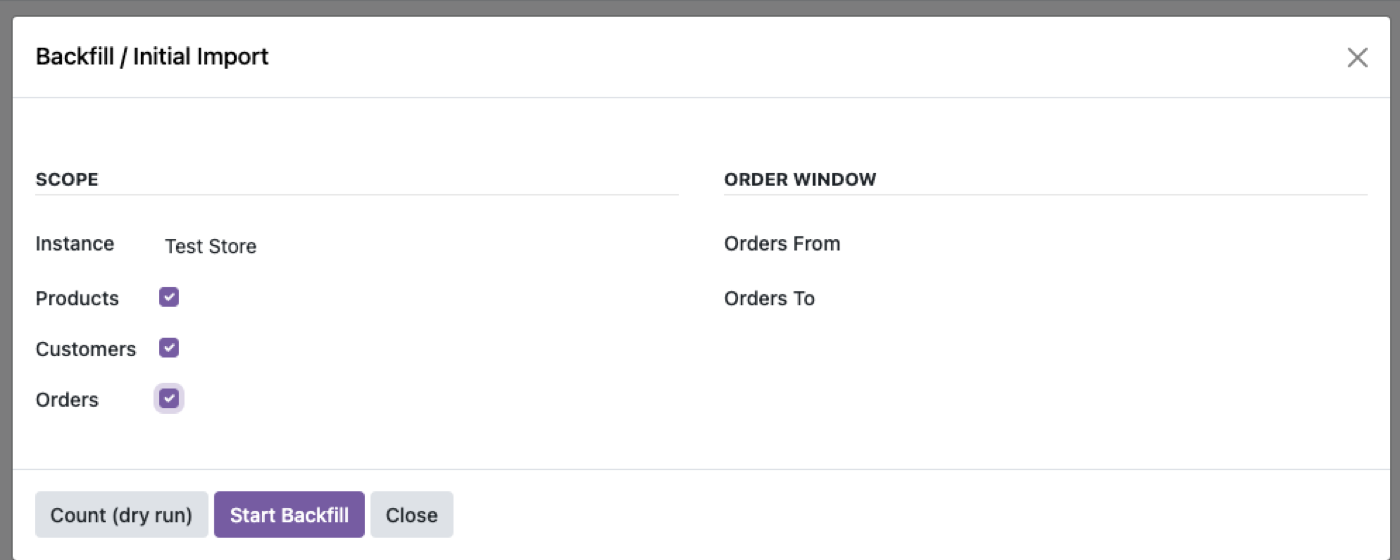
The first sync is the part people underestimate, and the design here reflects that:
Count first. A dry run tells you the scale before you commit — how many products, how many variants, how many will match and how many won't.
Resumable. It survives a worker restart. A backfill that has to start over after an interruption is a backfill that doesn't finish on a large catalogue.
Tested at 10,000 SKUs. That's the stated scale, and it's the honest way to answer "will this handle our catalogue" — with a number rather than "yes."
Practical advice: run the dry-run count against a duplicate of your production Odoo first, read the mismatch output, and fix the source data before the real run. If products are already failing to match during live sync, that's usually the same root cause — Shopify sync troubleshooting covers diagnosing it. Backfills expose every inconsistency in a catalogue at once, and it's much cheaper to fix them in Odoo than to unpick them from Shopify afterwards.
Multi-store
Each store is an independent binding with its own sync directions, conflict policy and company. Not a shared configuration with a store filter — genuinely separate, so a UK store on "Shopify wins" and a US store on "Odoo wins" is a normal setup rather than a workaround.
That also means adding a fourth store doesn't put the other three at risk, which is the thing to check when evaluating any multi-store connector.
What this doesn't do
- It doesn't sync order data. That's a separate flow — how Shopify orders sync into Odoo.
- It won't clean your catalogue. Duplicate SKUs, inconsistent variant structures and missing barcodes sync faithfully as they are.
- It doesn't do product content generation. Descriptions and images move; nothing writes them.
- Two-way inventory isn't a substitute for a stock policy. If two systems both adjust stock without a rule about which does what, they will disagree.
- It doesn't manage Shopify collections or navigation. Product data, not storefront merchandising structure.
If you're still comparing options, the eight questions in how to choose an Odoo Shopify connector apply to any vendor, including us.
$349. Once.
One-time purchase through the Odoo Apps Store. OPL-1, Odoo 19, Community and Enterprise. No per-order fee.
- Products two-way with real variant mapping — not flattened
- Inventory across multiple locations, Shopify locations ↔ Odoo warehouses
- Pricelist per store, optional compare-at
- Conflict policy you choose, per entity, logged every time
- Resumable backfill, dry-run count first, 10,000-SKU catalogues
Or get it free on an Odin deployment — from $150/month, unlimited users, every module included.
FAQ
Does Odoo Shopify product sync work in both directions?
Yes. Products sync two-way, including variants, images, SKU, barcode, weight and HS code. Inventory exports by default with two-way optional, and prices export.
How do I sync Shopify inventory with Odoo across multiple locations?
Shopify locations map to Odoo warehouses, so each fulfilment point reports its own stock level from the warehouse behind it rather than a single blended figure.
What happens if the same product is changed in both systems?
Your chosen conflict policy decides — Odoo wins, Shopify wins, or newest edit wins — and the decision is written to the Conflict Log rather than applied silently.
Can I use different pricing for different stores?
Yes. Each store binds to its own Odoo pricelist, with optional compare-at mapping.
How long does the first import take on a large catalogue?
It does a dry-run count first so you know the scale before committing, and the backfill is resumable — it survives a worker restart. Tested on 10,000-SKU catalogues.
Can I run more than one Shopify store?
Yes. Each store is an independent binding with its own sync directions, conflict policy and company.
Should I turn on two-way inventory sync?
Only if Shopify is genuinely performing stock adjustments Odoo can't see, such as a POS stock count. Otherwise export-only is the safer model, because Odoo knows about movements Shopify never sees.
The rest of the cluster
Stop reconciling Shopify by hand.
Run a backfill, force a conflict, watch it get logged.