Shopify orders not syncing to Odoo: causes and fixes.
Four things cause almost every missing or broken Shopify order in Odoo: a dropped webhook, an unmatched order line, rate limiting during a busy period, or a retry that created a duplicate. Each has a different symptom and a different fix, and the useful first step is working out which one you've got — because three of the four look identical from the Odoo side, where the order simply isn't there.
This page is written to help whichever connector you're running. Webhook drops and rate limits are Shopify platform realities, not one vendor's bug.
Start here: which symptom do you have?
| What you're seeing | Most likely cause | Section |
|---|---|---|
| Orders stopped arriving entirely, from a specific date | Dropped webhook | 1 |
| Some orders arrive, some don't, no pattern by time | Unmatched line failing the order | 2 |
| Orders are late rather than missing, worst during sales | Rate limiting | 3 |
| The same order appears twice | Retry after timeout | 4 |
| Everything is there but the totals are wrong | Tax mode, not a sync failure | 5 |
1. Orders stopped arriving: the dropped webhook
The symptom is distinctive. Orders arrive normally until a specific moment, then nothing — but the connection still tests fine, credentials are valid, and no error is logged. Nothing appears broken because from Odoo's point of view nothing happened at all.
The cause is Shopify. Webhook subscriptions get dropped. Repeated delivery failures, app permission changes, a timeout during a deploy, or occasionally no discernible reason. Shopify does not tell you it has stopped sending. This is normal platform behaviour rather than a fault, and it's the single most common cause of "our orders disappeared."
How to check, on any connector: query your registered webhook subscriptions through the Shopify Admin API and compare them against the topics your connector expects. If a topic is missing, that's your answer, and the gap is every order since it vanished.
What should happen automatically.
Odin's connector runs a daily cron that re-registers any webhook Shopify silently dropped, so the gap closes itself within a day rather than persisting until someone notices.
Recovering the gap. Re-registering the webhook fixes the future, not the past. Orders placed while the subscription was missing were never delivered and never will be — they need importing. The resumable backfill handles this: run a dry-run count over the affected date range first so you know what's coming, then import.
Prevention that works regardless of connector: alert on absence, not on errors. A rule that fires when no order has arrived in N hours during trading catches this in hours. Error monitoring never will, because there is no error.
2. Some orders missing, no time pattern: an unmatched line
The symptom: most orders arrive, some don't, and the missing ones have nothing in common by timing. Look at the missing ones in Shopify and they usually share a product — a new SKU, a bundle, a custom line item, a discontinued variant.
The cause: the connector couldn't match an order line to an Odoo product and rejected the whole order rather than part of it.
Why this design is common and wrong. Rejecting the order keeps the data model clean, at the cost of a paid customer with no record in your ERP. You discover it when they ask where their delivery is.
What should happen instead: the order lands with the unmatched line on a fallback product and the reason logged. Odin writes these to the Mismatch Log — the order is recorded, the revenue captured, the fulfilment obligation visible, and one line is flagged for a human.
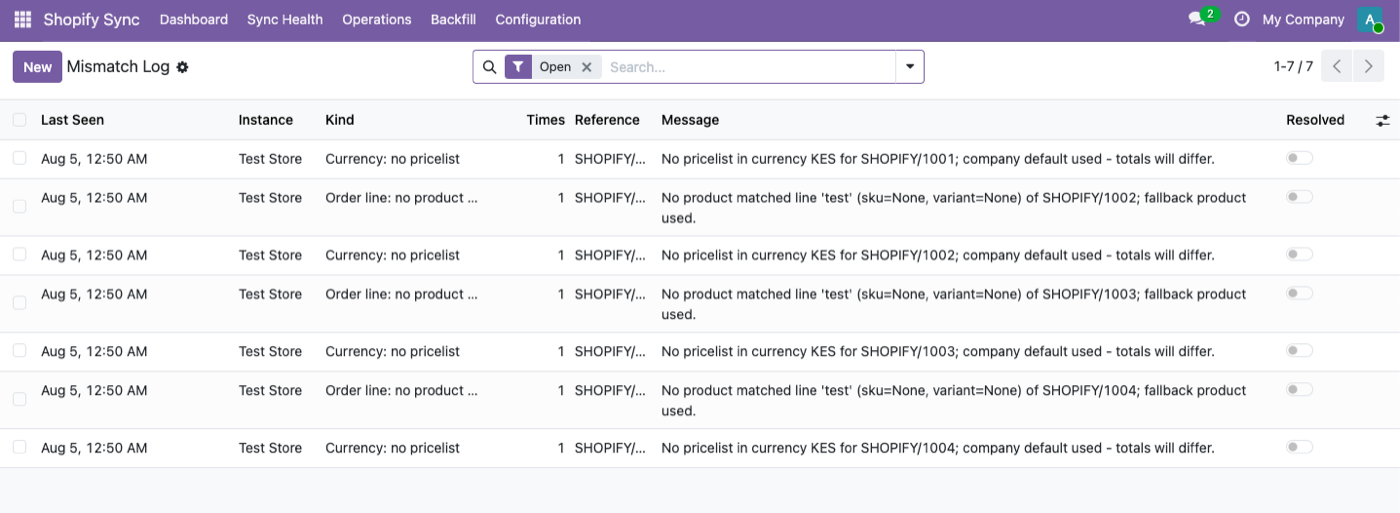
Usual causes: a product sold on Shopify that was never created in Odoo · a currency with no matching pricelist · a variant deleted in Shopify but referenced by an older order · a bundle or custom line with no SKU · a SKU that changed on one side only.
The fix is mapping, not sync configuration. Create or map the product, then reprocess. And check the product and inventory sync configuration afterwards — a line that failed to match usually means a product that failed to sync earlier.
3. Orders late, not missing: rate limiting
The symptom: everything arrives eventually, but with a delay that gets worse during flash sales, product launches and Black Friday. Exactly when you're watching.
The cause: Shopify rate-limits API access. On the GraphQL Admin API it's cost-based — each query has a computed cost against a leaky bucket that refills at a fixed rate — so a burst of expensive queries exhausts the budget and subsequent calls are refused with a 429 until it refills.
What good behaviour looks like: back off and retry. A 429 storm should delay syncs, never lose them.
Odin's connector tracks GraphQL query cost and backs off accordingly, so a rate-limit event slows the queue rather than dropping from it.
What bad behaviour looks like: treating a 429 as a failure, discarding the job, and moving on. That's how a busy Saturday becomes a set of orders that never arrived — and it's why this symptom is worth distinguishing from section 1. Late is fine. Late-and-then-abandoned is not.
How to tell them apart: wait. If the orders appear within an hour or two, it was rate limiting and the system is working as designed. If they never appear, treat it as section 1 or 2.
4. The same order twice
The cause is almost always a retry after a timeout. The connector processed the order, the acknowledgement didn't get back to Shopify before the timeout, Shopify retried the webhook, and the second delivery was processed as a new order.
Shopify's webhook delivery is at-least-once by design. Duplicates are not an anomaly — they're a guarantee of the transport, and the connector's job is to be idempotent about it: recognise the Shopify order ID it has already processed and discard the repeat.
We have not documented Odin's specific idempotency mechanism on this page, so we don't claim one. Ask for it before you buy — a serious evaluator will.
Other causes worth ruling out first:
- Two connectors, or one connector installed twice. More common than it sounds after a migration.
- A backfill overlapping live sync. Running an import over a date range that's also arriving by webhook.
- An order edited in Shopify creating what looks like a second record but is actually an update — check the Shopify order ID before assuming.
5. Everything synced but the numbers are wrong
Not a sync failure. Almost always the tax mode.
"Shopify amounts win" records the totals Shopify calculated, matching to the cent. "Odoo computes" applies your fiscal positions instead, and archives Shopify's tax lines in a note.
If your Odoo and Shopify reports disagree by small amounts on some orders, you're in "Odoo computes" and your fiscal positions differ from Shopify's tax engine. That's a configuration decision, not a bug — but it needs to be a decision somebody made deliberately. Full detail in how Shopify orders sync into Odoo.
The screen to check first
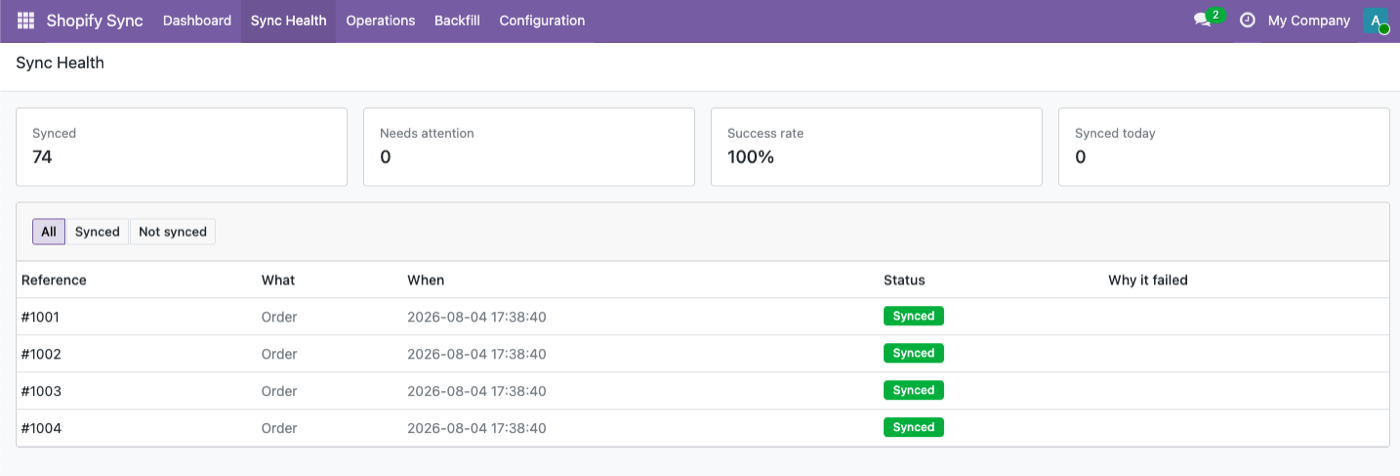
Sync Health shows live success rate and per-record status. Before diagnosing anything, look here — it distinguishes "nothing is arriving" from "things are arriving and failing" in one glance, and those two have entirely different causes.
A monitoring setup that catches all four
Whatever you're running:
- Alert on absence. No orders in N hours during trading. Catches dropped webhooks, which error monitoring never will.
- Alert on mismatch-log growth, not just on errors. A rising count of fallback lines means product mapping is drifting.
- Compare daily order counts between Shopify and Odoo. One number each, once a day. Catches everything above within 24 hours.
- Watch success rate during peaks, not averages. A 99% monthly average hides a bad Saturday entirely.
If you're evaluating connectors because of this
Fair. The four failures above happen to everyone, so the question isn't whether a connector hits them — it's what it does when it does. The eight questions worth asking any vendor are in how to choose an Odoo Shopify connector.
Odin's Odoo Shopify connector is $349 one-time, Odoo 19, and there's a live sandbox at sandbox.odin.ist/odoo/shopify-sync (admin/admin) — break something in it deliberately and watch what happens. That's a more useful evaluation than any feature list.
FAQ
Why did my Shopify orders stop syncing to Odoo?
Most often a dropped webhook subscription. Shopify stops sending without notifying you, so nothing errors — orders simply stop arriving from a specific moment. Check your registered webhook topics against what the connector expects.
Why are only some Shopify orders missing in Odoo?
Usually an order line that couldn't be matched to an Odoo product, causing the connector to reject the whole order. The missing orders normally share a product, not a time window.
Will a Shopify rate limit lose my orders?
It shouldn't. Correct behaviour is to back off and retry, so a 429 delays syncing rather than dropping it. If orders never arrive at all, it's a different cause.
Why do I have duplicate Shopify orders in Odoo?
Shopify webhook delivery is at-least-once, so a retry after a timeout can deliver the same order twice. The connector needs to recognise an already-processed Shopify order ID. Also check for two installed connectors or a backfill overlapping live sync.
My orders synced but the totals don't match Shopify. Why?
That's the tax mode, not a sync failure. "Odoo computes" applies your fiscal positions instead of Shopify's tax lines, which produces small differences by design.
How do I recover orders missed while a webhook was down?
Re-registering the webhook only fixes future orders. The missed range needs importing — run a dry-run count over those dates first, then backfill.
How do I get alerted before a customer tells me?
Alert on absence rather than errors: no orders received in N hours during trading. A dropped webhook produces no error to alert on.
The rest of the cluster
Break something on purpose.
Live sandbox — admin / admin. Watch what the connector does.