How to hide a menu for certain users in Odoo
Restrict the model's Views switch for that Access Profile. This removes the menu the same way Odoo's native groups attribute on a menu item does — but because the restriction lives on the model, it also holds outside the menu.
If the goal is to actually stop that group reaching the data — not just to tidy their home screen — read why hiding a menu isn't the same as restricting the model first.
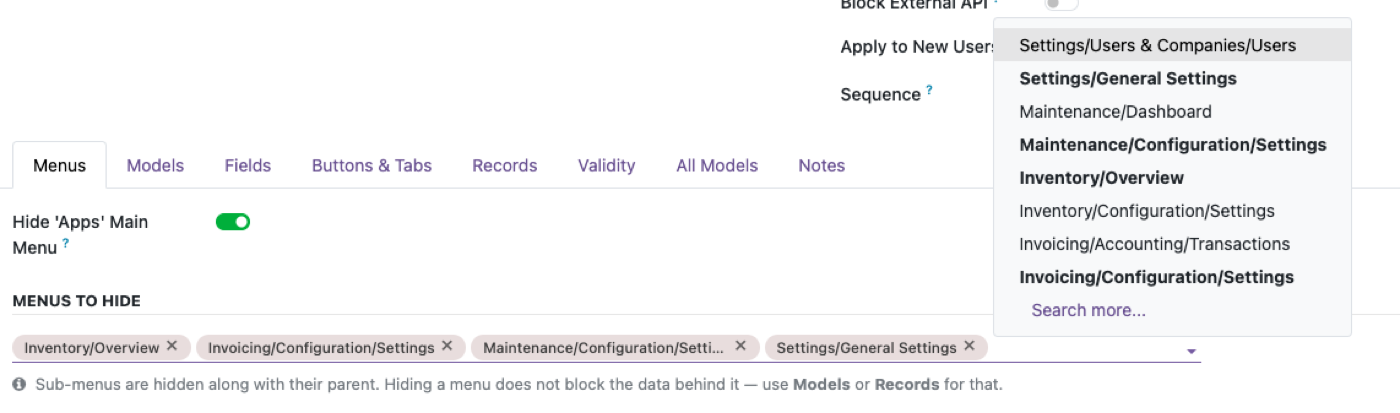
Find the model behind the menu
Every Odoo menu item points at a model or an action — that's what you're actually restricting.
Turn off Views for the profile
This removes the menu entry and blocks the model's own view access together.
Decide if you need the deeper fix
If the group could still reach the data through a report, smart button, or the API, restrict the model fully.
Hiding a menu does not hide the model
Odoo menus are ir.ui.menu records with optional groups. Clearing the menu is what people mean by “they shouldn’t see Accounting.” The model is still there: a smart button on a contact, a related field, a report, a bookmarked URL, XML-RPC. Access rights on the model are the control that matters. The longer piece is why hiding a menu is not restricting the model.
Access Manager Pro’s Views switch on the model is meant to tidy navigation and hold outside the menu. Use it when the goal is “this role does not work in that app,” not “please hide the icon and hope.”
Still hide the menu — just do not stop there
A warehouse user with a home screen full of accounting menus will click the wrong thing and file a ticket. Hiding menus is good UX. Pair it with model rights so the accidental URL does not open a journal item.
App icons are one level up again: hiding an app is not the same as restricting every model that app installed. Test with a smart button from a document they are allowed to open.
Three tests that catch a menu-only restriction
As the restricted user: (1) the menu is gone; (2) a related record’s smart button that would open the model is gone or refused; (3) an API search_read on that model is refused. If (1) passes and (2) or (3) fail, you have a navigation change, not security.
Admins should stay exempt so you cannot hide Settings from yourself. That is a product rule in Access Manager Pro, and a reason native group experiments go badly on production.
The rest of the cluster
Before you set it up
If the menu is gone, can they still open the model?
Yes — smart buttons, related fields, reports, a typed URL, or an API call. Hiding a menu is UI. Restricting the model is access rights. See why hiding a menu is not restricting the model.
Should I still hide the menu?
Yes, for a cleaner home screen. Just do not treat that as the security layer.
Does this apply to Enterprise as well as Community?
Yes. Menu visibility and model-level access rights are separate in both editions.
Ready to lock this down?
Try it on the live sandbox first — nothing to install.