Odoo hide apps from users — the icon is not the lock.
Unchecking an app on the user form hides the home-screen icon. Odoo’s own security docs treat menus as visibility. The models behind Accounting, Inventory or HR are governed by groups and ir.model.access. Hide both, or a smart button will reopen the room you just locked the door on.
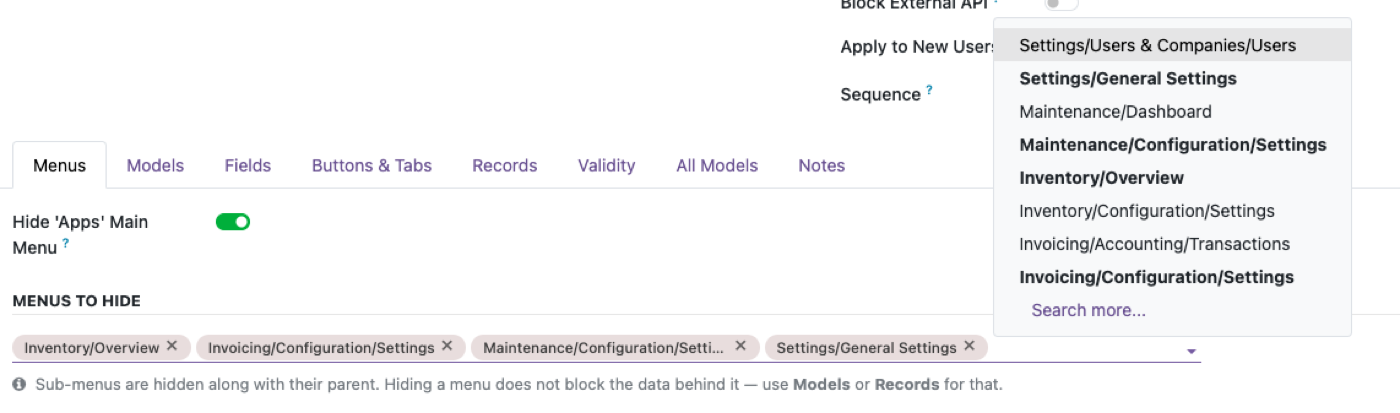
This is the how-to for “hide apps from users.” One level down — a single menu item, not the whole app — is hide a menu for certain users. Neither page is “uninstall the module.” Uninstalling Accounting because warehouse staff should not see it is how you lose invoices the warehouse still needs to exist.
How to hide apps from users on the Access Rights tab
Odoo’s user guide: Settings → Users & Companies → Users (or Settings → Manage Users), open the user, Access Rights tab. Each installed application is a dropdown: blank/none, User, Administrator, and variants like “own documents.” The list of applications is whatever is installed. Set Accounting to blank for a warehouse user and the Accounting app icon should drop off their home screen.
Those dropdowns are groups. Odoo documents groups under Settings → Users & Companies → Groups (developer mode). A group’s Menus tab is which menus members may see. A group’s Access Rights tab is ir.model.access — read/write/create/unlink on models. Official users docs: Users · Access rights.
- Pick the user, not a shared admin login.
- Set the app dropdown to none for apps they should not navigate.
- Log in as that user in a private window. Confirm the icon is gone.
- Then try a smart button, a related list, or a direct
/odooURL to a model in that app. If it opens, you hid the app, not the model.
App icon, menu groups, and model ACLs are not the same switch
Odoo’s restrict-access tutorial is blunt: groups on menus and actions are visibility. The menu is not shown; that does not stop someone calling the underlying object. If a menu points at a model the user cannot access and has no visible submenus, the menu hides — because there is nothing left to show, not because the model was sealed.
Access rights are additive. They grant; they do not subtract. If any group on the user allows read on account.move, unchecking the Accounting app does not revoke it. Default is deny only when no ACL matches. Cite: Restrict access to data · Security in Odoo.
Concrete case: warehouse supervisor, Accounting icon off. Inventory still shows a smart button to the customer invoice on the delivery. The invoice model was never taken away — only the app that normally opens it. Same pattern as restrict menu access, one bundle higher.
Do not uninstall the app to hide it
Uninstalling Inventory to hide it from salespeople deletes the operational data path, not a permission. Portal users already have a different, restricted shape — do not copy portal onto internal staff by stripping modules. Internal users who should not see HR need the HR groups off and the HR models locked; they still need Discuss, and they still need whatever HR fields leak onto employees if you leave those readable.
Do not hide apps “in Studio” on one company view and assume multi-company is covered. Allowed companies on the user form are a different control. A user with Accounting in company A and none in company B can still hit records if record rules are loose.
Standard groups vs a profile that must hold on smart buttons
If the job is “sales should not see Accounting in the app switcher,” the Access Rights dropdown is the right first move. If the job is “warehouse must never open an invoice, including from a transfer,” you need model rights (and often record rules), not only the icon.
Access Manager Pro is for the second job: model-level switches (including views and reports) on an Access Profile, so the invoice is gone from the delivery record too. It is not required to hide an icon. Try it on the sandbox if the smart-button test fails. Product: Access Manager Pro.
Official documentation
FAQ
How do I hide apps from users in Odoo?
Open the user, Access Rights tab, set the application dropdown to none. That hides the icon via groups. Then test models through smart buttons — hiding the app is not the same as removing ir.model.access. Access rights.
Is removing app access from a user's profile pointless?
No. It is the right way to clean the home screen. It is one layer. Odoo treats menu groups as visibility, not as a model lock.
Does this affect the Odoo Apps store / installed modules list?
No. That is admin. This page is what an internal user sees among apps already installed.
What's the fastest way to check if I have this gap?
Hide the app, log in as that user in a private window, open a related record that should still be allowed, and click through to a model from the hidden app. If it opens, restrict the model, not just the icon.
The rest of the cluster
Ready to lock this down?
Try model-level rules on the live sandbox first — nothing to install.