Multi-company access control in Odoo.
Odoo lets you allocate a user to one or more companies, and for most day-to-day work that holds. The gap people find later is narrower and more awkward: record restrictions that filter list views correctly can still leak the full picture through aggregates. A user sees only their own company's orders in a list, opens a pivot, and reads a group-wide total. Access Manager Pro's record access holds in pivot and graph totals too — which is the specific thing most access modules don't mention because they haven't handled it.
The leak, precisely
You run four entities in one database: a trading company, a manufacturing arm, a property company, a dormant holding company. A finance analyst is allocated to trading only.
They open Sales, and see trading orders. Correct.
They switch to the pivot view and look at revenue by month. Depending on how the restriction was implemented, they may now be reading a total that includes all four entities — because the aggregate was computed over rows the rule was expected to filter, and the filtering happened somewhere the aggregation didn't go through.
This is worse than a list-view leak for two reasons. A total is unattributable — there are no visible rows to notice as unfamiliar, so nothing looks wrong. And a total is the thing people report upward, so the leak travels.
The same shape appears in graph views, in grouped list totals, and in anything that reads a sum rather than the records behind it.
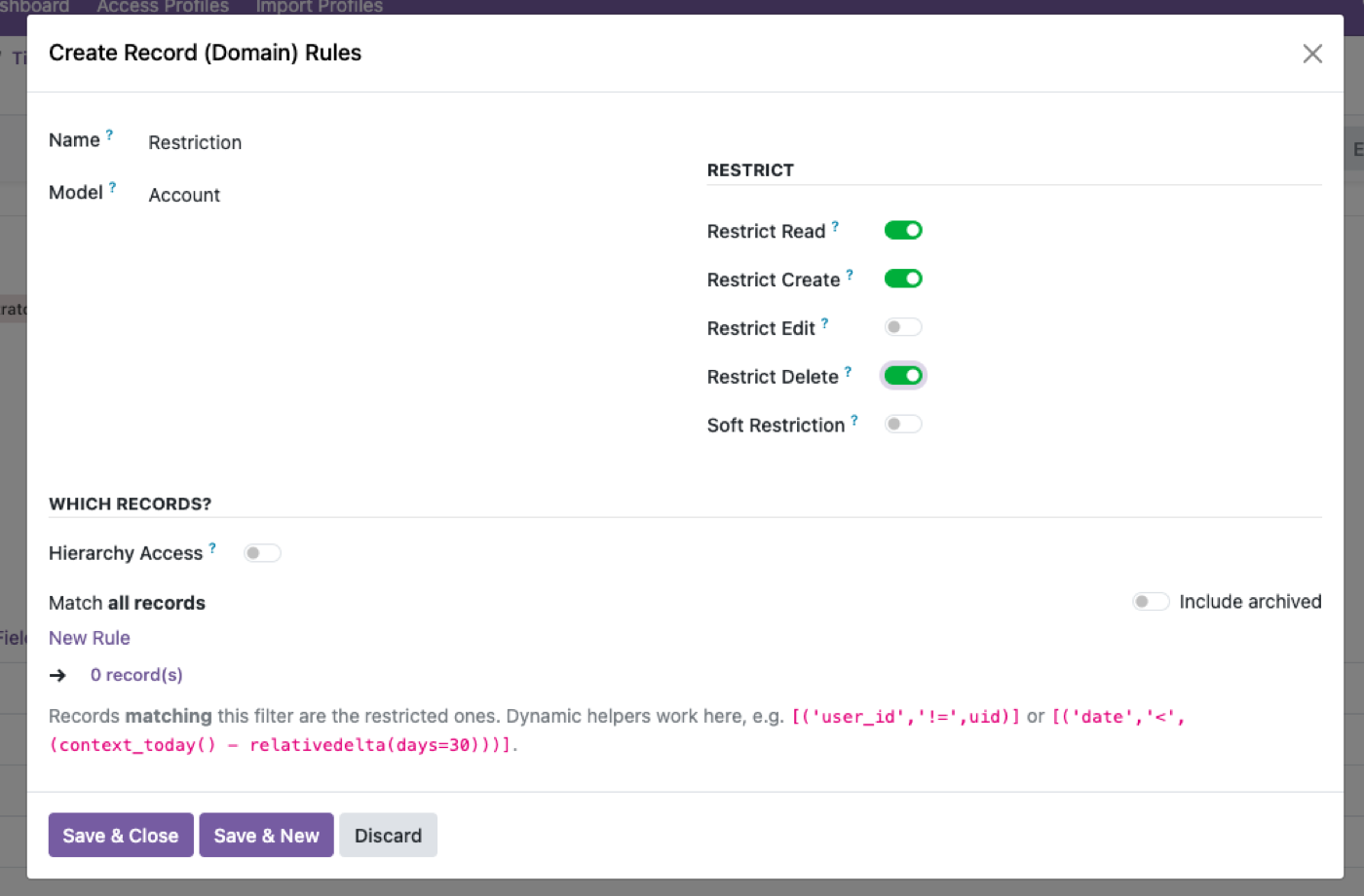
Company and domain restrictions configured in the interface — and enforced where the totals are computed, not only where the rows are listed.
How to test your own instance in five minutes
Do this before buying anything, ours included. It's the only way to know whether you have the problem.
- Create a test user allocated to one company only.
- Log in as that user — actually as that user, not as admin with a company filter applied. Admin bypasses record rules entirely, so testing as admin proves nothing at all.
- Open Sales → Orders. Confirm the list shows one company.
- Switch to the pivot view. Add revenue as the measure, group by month.
- Compare the grand total against the same pivot as admin, filtered to that one company.
If the two numbers differ, you have the leak. If they match, your record rules are reaching the aggregate path — good, and worth re-testing after any module install that touches those models.
Do the same for the graph view and for a grouped list, because they don't all take the same route.
What multi-company control should cover
Company allocation. A user restricted to one or more companies, with the allowed set explicit rather than implied by group membership.
Record rules that hold everywhere. List, form, pivot, graph, grouped totals, exports, reports and the API. One rule, every read path — otherwise you're maintaining a restriction that's true in some views and false in others, which is harder to reason about than no restriction.
Field-level rules that respect the company too. A cost price visible in one entity and masked in another is a normal group requirement.
The API route closed. Interface restrictions are irrelevant if a user can reach the same records over XML-RPC. Blocking the Odoo external API per user is the switch for that.
Rules that survive a new entity. When the group acquires a fifth company, the rules should describe the relationship, not enumerate the four that existed when they were written.
Inter-company work still has to happen
The mistake in the other direction is locking down so hard that legitimate group operations break. Real cases that need to cross the boundary:
- Group consolidation reporting — somebody has to see all four, and that person's access should be deliberate rather than accidental.
- Shared master data — one product catalogue, one supplier list, several selling entities.
- Inter-company transactions — a sale in one entity that's a purchase in another.
- Shared services staff — a group accountant covering three entities and not the fourth.
That last one is why "one company per user" is too blunt a model. Users need sets of companies, and the set is rarely the same for two people. Profiles handle this by targeting users, groups or both — see role-based access control in Odoo.
The AI angle, since it's now a live question
If you connect an AI assistant to a multi-company Odoo, every one of the above becomes visible immediately. Someone asks "what was revenue last quarter" and gets a number. Whether that number respects their company allocation depends entirely on whether your record rules reach the aggregate path.
An assistant summarising a total is the most efficient way ever invented to surface an aggregate leak, and it does it in front of whoever asked. If you're planning that, test the pivot first — connecting an AI assistant across companies covers what holds automatically and what doesn't.
What this doesn't do
- It doesn't build your company structure. Odoo's multi-company setup is Odoo's. This controls who reaches what within it.
- It can't grant cross-company access. Rules only narrow. If someone's Odoo allocation doesn't include an entity, nothing here adds it.
- It doesn't handle inter-company transaction automation. That's a different Odoo feature.
- It won't fix a chart of accounts problem. If entities are structured inconsistently, restricted views will be inconsistently useful.
$343. Once.
One-time purchase through the Odoo Apps Store. OPL-1, Odoo 19, Community and Enterprise. No per-user fee.
- Restrict a user to one or more companies
- Record access holds in pivot and graph totals, not just list views
- Field-level rules, including masking, on top of company restrictions
- Block the external API per user so the interface isn't the only boundary
- Rules export as JSON and move between databases
Or get it free on an Odin deployment — from $150/month, unlimited users.
FAQ
How do I restrict a user to one company in Odoo?
Allocate them to that company and apply record rules that hold across every read path. The allocation is the easy half; the rules holding in aggregates is the half worth testing.
Do Odoo record rules apply to pivot and graph views?
They should, and with Access Manager Pro they do. Whether they do in your current setup is worth testing directly — a rule that filters a list correctly but leaves a group-wide pivot total is a common and quiet leak.
How do I test whether my multi-company restrictions actually hold?
Log in as a restricted test user — not as admin with a filter — open a pivot, and compare its grand total against the same pivot run as admin filtered to that one company. If they differ, the rule isn't reaching the aggregate.
Can a user belong to more than one company?
Yes. Users are allocated a set of companies, which is what shared-services staff covering several entities need.
Does this stop someone reaching other companies' data through the API?
Record rules are enforced server-side, so they apply to API reads. You can also block a user's external API access entirely — XML-RPC, JSON-RPC and API keys.
Will an AI assistant respect company isolation?
It runs as the signed-in user, so it inherits whatever that user's rules actually enforce — including any aggregate gap. Test the pivot before connecting anything.
What happens after I try the demo?
Buy it on the Odoo Apps Store and install it — or book a call and we'll set it up. Please undo changes on the shared demo before leaving.
The rest of the cluster
Give people exactly enough access. No more.
Build a real profile and watch restrictions hold over the API.