Odoo security groups and access profiles.
Odoo security groups are additive: a user's access is the union of everything their groups allow, and there is no way for one group to take away what another grants. That single property explains most of what goes wrong with Odoo permissions over time, and it's why a restriction layer has to sit on top rather than inside the group system.
What a security group actually contains
A group in Odoo bundles three kinds of thing:
Access rights (ir.model.access) — per model, four flags: read, write, create, unlink. Model level only. If a group grants read on res.partner, it grants read on every partner record, subject to record rules.
Record rules (ir.rule) — domains restricting which records the operation applies to. Global rules apply to everyone regardless of group; group rules apply to members and combine with OR between groups.
Menu, view and field visibility — via groups= attributes in XML.
The two combination rules are the ones worth memorising, because they're where intuition fails:
- Access rights across groups combine with OR. Any group granting an operation grants it.
- Group record rules combine with OR too. Being in a second group can widen which records you see, never narrow it.
- Global record rules combine with AND and apply to everybody.
Why access only ever grows
Follow those rules through and the consequence is structural: in native Odoo, adding a user to a group can only ever increase their access.
There is no "deny" primitive. If Payroll Officer grants read on hr.payslip, then anyone in that group reads payslips — and adding them to a more restrictive group doesn't help, because the more restrictive group's rules are ORed in, not ANDed.
So the only native way to reduce someone's access is to remove them from a group, which usually removes something they need along with the thing they shouldn't have. In practice teams respond by creating a new, slightly different group. Which is how an instance ends up with fourteen variations of "Sales / User", each granting a slightly different set, and nobody able to say what any of them mean.
That's not misuse of the system. It's the system working as designed, applied to a requirement it wasn't designed for.
Where profiles fit
Access Profiles layer on top of groups rather than replacing them. Your existing group structure stays exactly as it is.
The relationship is one sentence: the effective permission is always the narrower of the profile's rules and the user's own Odoo access rights.
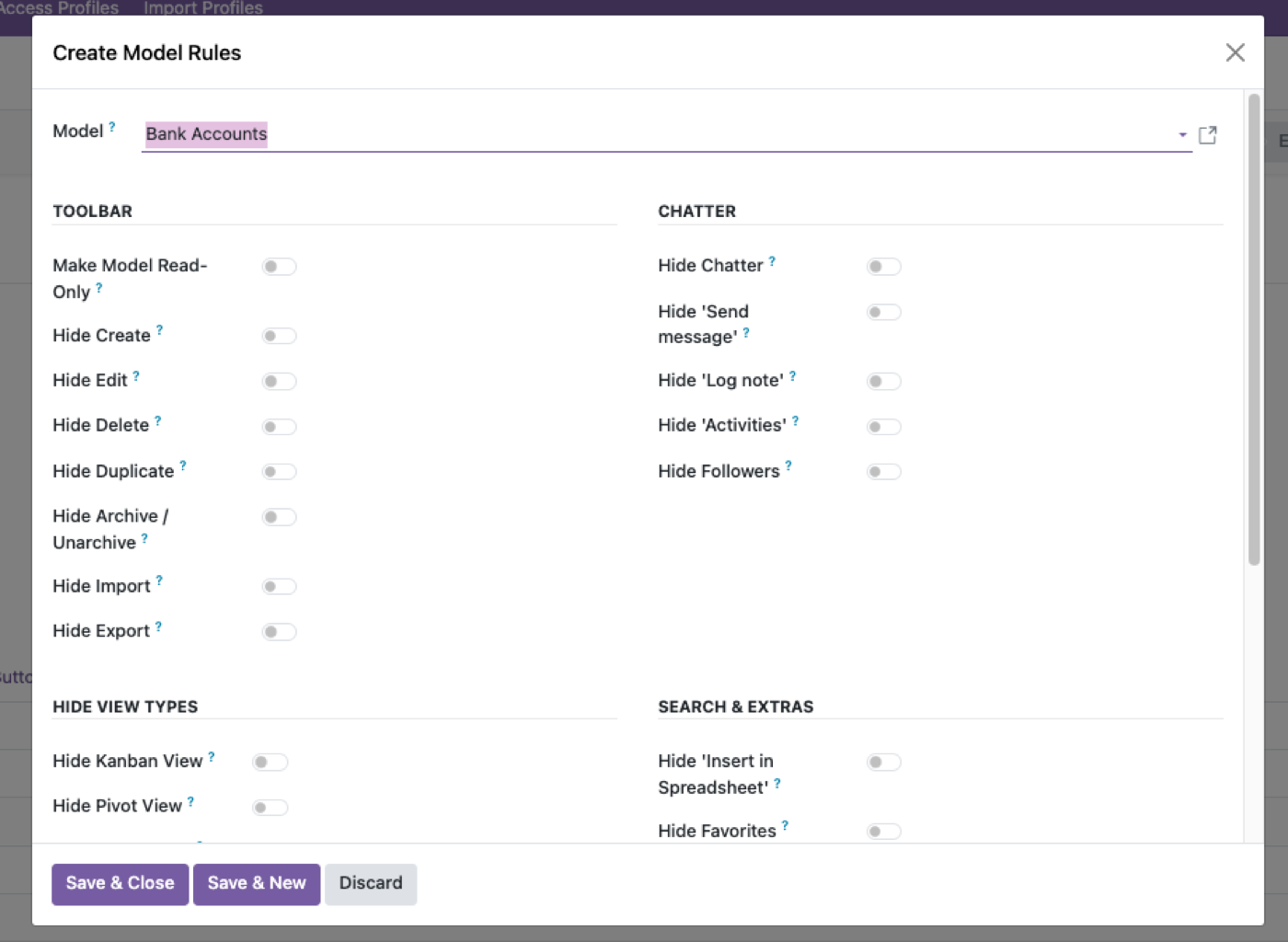
So groups keep doing what they're good at — defining the maximum a role can reach — and profiles supply the missing deny primitive, defining the actual. Two useful consequences:
Nothing you've already built breaks. Profiles are additive to your configuration and subtractive in effect. Remove the module and you're back to your groups, unchanged.
No misconfiguration escalates. Because profiles can only narrow, the worst outcome of a mistake is someone being blocked from something they should be able to do — noticed immediately, fixed immediately. The dangerous failure mode, silently granting access, isn't reachable.
What groups can't express at all
Even used well, groups have no vocabulary for these — which is where the profile layer earns its place rather than merely tidying:
| Requirement | Native groups |
|---|---|
| Stop a user duplicating a record | No such flag — create covers it |
| Stop a user exporting while keeping read | No such flag |
| Stop a user archiving | Falls under write |
| Stop a user printing reports | Not a permission |
| Hide one field from one group | XML view inheritance, per view, per developer |
| Show a field masked | Nothing at all |
| Access that expires on a date | Nothing |
| Block a user's API access but not their login | Nothing |
The last three are where field-level security in Odoo and the per-user session switches in Odoo access control pick up.
The first four are the ones people hit first, because they're the obvious workarounds a restricted user finds: duplicate the record you couldn't create, export the list you couldn't print.
Practical advice, whether or not you buy anything
Keep groups coarse. Groups should describe broad capability — "can use Sales", "can use Accounting". Resist encoding fine restrictions into new groups; that's the path to fourteen variants. Fine restrictions belong in a layer above — see role-based access control in Odoo.
Never use a hidden menu as access control. A groups= attribute on a menu hides navigation. The data is still reachable by URL, by API, by export and by search. Menus are convenience; access rights and record rules are control.
Check aggregates when you test a record rule. Open a pivot as the restricted user. A rule that filters a list view correctly but leaves a company-wide grand total in a pivot is a real leak, and it's common.
Test as the user, not as admin with a filter applied. Admin bypasses record rules entirely, so testing as admin tests nothing.
And once the group layer is coarse and correct, the lifecycle problem is the one left standing — profiles expiring, new joiners inheriting the right rules, configuration moving between databases. That's covered in managing access rights in Odoo.
$343. Once.
One-time purchase through the Odoo Apps Store. OPL-1, Odoo 19, Community and Enterprise.
- Layers on native groups — your existing structure is untouched
- Supplies the deny primitive Odoo doesn't have
- Nine per-model switches including Duplicate, Archive, Export, Reports, Views
- Field-level control including masking, which groups can't express at all
- Can only narrow — no configuration escalates a privilege
Or get it free on an Odin deployment — from $150/month, unlimited users.
FAQ
How do Odoo security groups combine?
Additively. Access rights across a user's groups combine with OR, and group record rules also combine with OR — so joining another group can only widen access. Global record rules combine with AND and apply to everyone.
Can one Odoo group take away access granted by another?
No. Native Odoo has no deny primitive at group level. The only native way to reduce access is to remove the user from the group granting it.
Does Access Manager Pro replace Odoo security groups?
No — it layers on top. The effective permission is always the narrower of its rules and the user's own Odoo access rights, so groups still define the maximum.
Does hiding a menu block access to the data?
No. Hiding a menu is a navigation convenience. The records remain reachable by URL, API, export and search. Use model or record rules to actually block data.
Why can't I stop someone exporting with a security group?
Because export isn't a distinct permission in native Odoo — read covers it. Separating export from read requires a layer above groups.
How should I test a record rule?
As the restricted user, and in a pivot as well as a list view. Admin bypasses record rules, so testing as admin proves nothing.
What happens after I try the demo?
Buy it on the Odoo Apps Store and install it — or book a call and we'll set it up. Please undo any changes on the shared demo before leaving.
The rest of the cluster
Give people exactly enough access. No more.
Build a real profile and watch restrictions hold over the API.