Role-based access control in Odoo.
Odoo doesn't have roles in the RBAC sense — it has security groups. The difference matters more than the vocabulary suggests: a group grants a bundle of access rights, but there's no first-class object representing "what a Sales Manager is," no way to assign it as one unit, and nothing that applies automatically when a new Sales Manager arrives. Access Manager Pro adds that object. It's called an Access Profile, and it's the product's real role construct.
Why "Odoo roles" returns confusing answers
If you've come from Salesforce, NetSuite or SAP, you're looking for something Odoo doesn't ship, and the search results reflect that. What you'll find:
- Security groups — the closest native equivalent. A group carries model-level access rights and record rules. Users belong to several. Effective access is the union of everything their groups allow.
- "User types" — Internal User, Portal, Public. Not roles; a different axis entirely.
- Access rights and record rules — the mechanics groups are built from.
The gap is that groups are additive and unstructured. Access accumulates as people are added to more of them, nothing describes the intended shape of a job, and there's no way to say "this is what this role is" and have it hold.
Access Profiles: the role object
A profile is a named, reusable set of restrictions — model permissions, field permissions, record rules and session controls, held together as one thing.
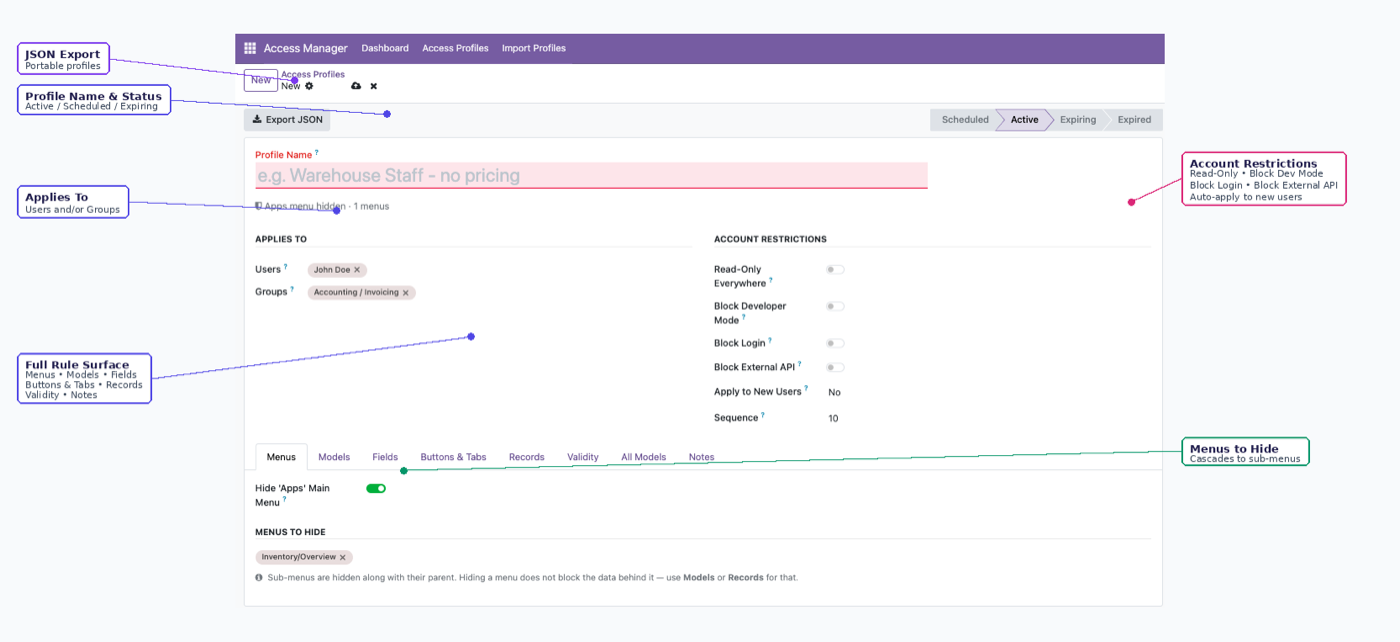
Three properties make it behave like a role rather than another group:
It targets users, groups, or both. So a profile can apply to everyone in the Sales / User group and three named people outside it, without either of those being a separate configuration.
New joiners matching its criteria are enrolled from their first login. This is the one that actually distinguishes a role from a bundle. You describe the job once; whoever holds the job next inherits it without anyone remembering to act.
It narrows rather than grants. The effective permission is always the narrower of the profile and the user's own Odoo access rights. Which inverts the usual RBAC model in a useful way — see below.
The inversion worth understanding
In most RBAC systems, roles grant. You start with nothing and a role gives you access.
Here, native Odoo groups grant, and profiles restrict. You start with whatever your groups allow, and the profile takes access away.
That sounds like a limitation. In practice it's the safer arrangement for an existing Odoo instance, for one reason: no profile configuration can escalate a privilege. There's no misconfiguration that accidentally gives someone more than they had. The worst outcome of a mistake is that somebody can't do something they should be able to — visible, reported within a day, trivially reversible.
The alternative failure mode, where a mistake silently grants access, is the one you don't find out about.
It does mean the two layers work together rather than one replacing the other: groups define the maximum, profiles define the actual. Odoo security groups covers how the layering works in detail.
Designing profiles that hold up
Write profiles for jobs, not people. "Warehouse Operative" survives staff turnover. "Restrictions for James" doesn't survive James.
Fewer and broader beats many and specific. Three or four profiles covering most of the organisation, plus a small number of genuine exceptions, is maintainable. Twenty near-identical profiles is a second permissions system to maintain badly.
Don't copy an existing user to set up a new one. Copying propagates every accumulated exception that user picked up. This is the single most common way permission drift spreads, and profiles exist to replace it.
Use hierarchy where the org chart is the rule. Record access can be set to "own + subordinates," which reads the real manager chain from Employees. A sales manager sees their team's records because the Employees app already knows who reports to them — nobody re-teaches the reporting line to the access system, and it updates when the org chart does.
Time-box anything temporary at the point of granting. Contractors, auditors, cover. Access that expires on its own is the only kind that reliably expires — the lifecycle side of this is covered in managing access rights in Odoo.
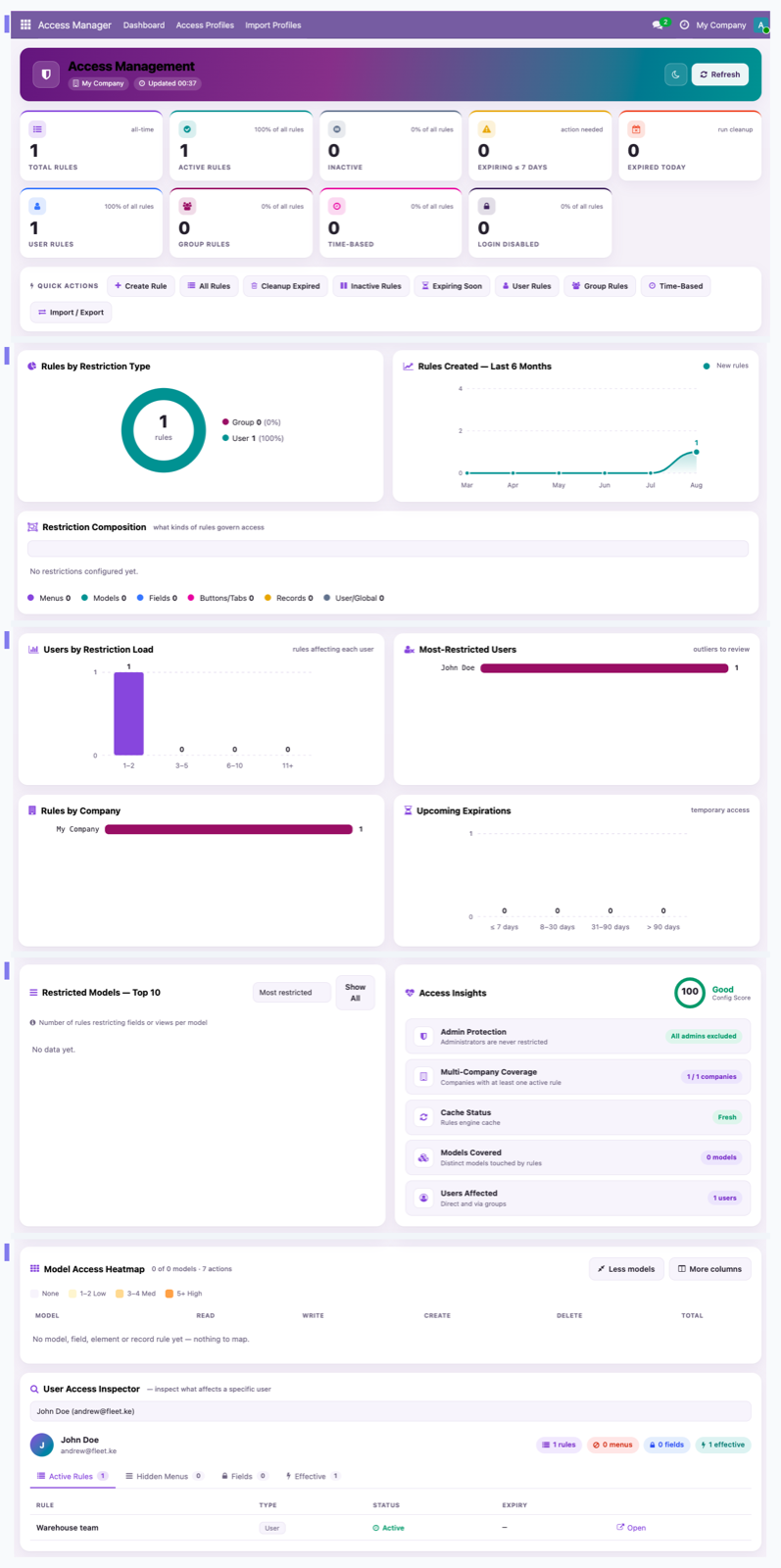
Active profiles, expiring access and most-restricted users on one screen — plus a per-user inspector for "what can this person actually do?"
Moving roles between environments
Profiles export as JSON and import into another database. Unresolved references are skipped and logged rather than guessed at.
Practically, that means a role definition is a file. It can live in version control, be reviewed in a pull request, and be applied identically to staging and production — which is the difference between a role model that's designed and one that's remembered.
What this doesn't do
- It isn't a replacement for security groups. It layers on top of them. You still need groups to define what people can reach at all.
- It can't grant. If someone's groups don't allow a model, no profile makes it available.
- It doesn't do approval workflows. Profiles control access, not business process. Odoo's own approval mechanisms handle the second.
- It doesn't audit historical access. It controls what people can do from now on.
For the group-structure case — several legal entities in one database, users allocated to a subset — see multi-company access control in Odoo. For the whole product, Odoo access control.
$343. Once.
One-time purchase through the Odoo Apps Store. OPL-1, Odoo 19, Community and Enterprise. No per-user fee.
- Access Profiles targeting users, groups, or both
- New joiners auto-enrolled from their first login
- "Own + subordinates" access reads the real manager chain from Employees
- Profiles export as JSON — reviewable, portable, version-controllable
- Can only narrow, never grant — no escalation path from a misconfiguration
Or get it free on an Odin deployment — from $150/month, unlimited users.
FAQ
Does Odoo support role-based access control?
Not natively. Odoo has security groups, which grant bundles of access rights additively. Access Profiles add a role-shaped layer on top — named, reusable, auto-enrolling and portable.
What's the difference between an Odoo security group and an Access Profile?
Groups grant access and combine additively. Profiles restrict, target users or groups or both, apply automatically to matching new joiners, and export as JSON.
Can a role apply automatically to new staff?
Yes. A new user matching a profile's criteria is enrolled from their first login.
Can a manager see only their own team's records?
Yes. Record access can be set to "own + subordinates," which reads the real manager chain from the Employees app rather than a separately maintained list.
Can a profile give someone more access than their groups allow?
No. The effective permission is always the narrower of the profile and the user's own Odoo access rights, so there's no escalation path.
Can I move a role definition between databases?
Yes — export the profile as JSON and import it. References the target database can't resolve are skipped and logged.
What happens after I try the demo?
Buy it on the Odoo Apps Store and install it — or book a call and we'll set it up. It's a shared demo, so please undo your changes before leaving.
The rest of the cluster
Give people exactly enough access. No more.
Build a real profile and watch restrictions hold over the API.