Odoo JSON-2 API authentication.
JSON-2 uses Authorization: bearer YOUR_API_KEY. Create a dedicated integration user, then a dedicated key — not your administrator password.
Every JSON-2 request carries:
Authorization: bearer YOUR_API_KEYOdoo recommends a dedicated key per service so you can audit and revoke without rotating everything else. For AI, that service is the MCP server — the key never belongs in a prompt, a git repo, or a Slack paste.
Dedicated integration users
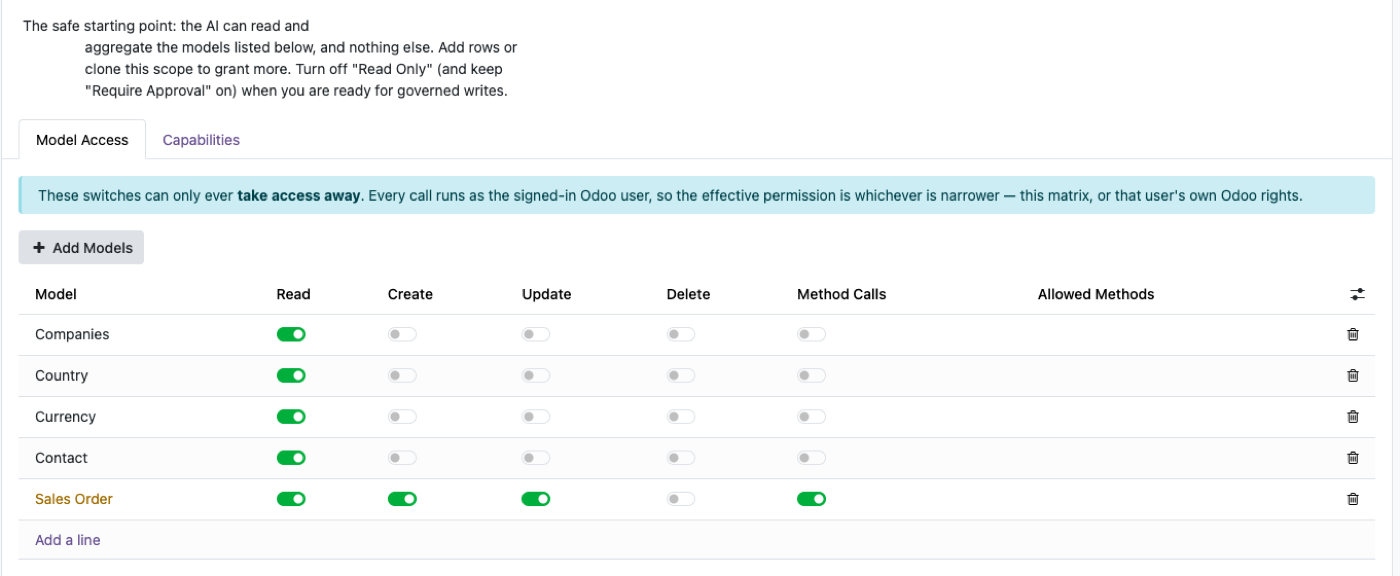
Create a user such as “AI Odoo Agent”. Grant only the models the MCP tools need. If the key leaks, read-only sales is a different incident from administrator.
Odoo’s JSON-2 docs also note you can empty the password on a bot user to disable login/password auth, and that Access Log fields then show the bot — nobody is impersonated.
API key lifecycle
Create → use → monitor → rotate → revoke. Generate the new key first, cut traffic over, then revoke the old one. Do not revoke first and discover production is down.
Programmatic generate/revoke exists on res.users.apikeys for environments that enable it. Most AI setups start with a manually created key and a calendar reminder before the three-month cap.
Next: MCP security · JSON-2 overview · agent + JSON-2 + MCP.
A JSON-2 key is a user, not a robot exemption
Bearer authentication on /json/2 identifies an Odoo user. Every ACL, record rule and field restriction on that user applies. There is no parallel “API admin” universe. If the user cannot see payroll in the UI, JSON-2 will not show payroll either — unless you accidentally used an admin user for the key.
Odoo’s External API docs recommend dedicated bot users for integrations and document that keys expire in at most three months. Build rotation and a named owner into the runbook. A key in a chat vendor’s connector settings is still your ERP credential.
Revocation is disabling the key or the user. Do not rely on “we unpublished the MCP URL.” Something else may still hold the bearer token. MCP security for the AI-shaped version of the same rules.
Admin keys, shared keys, keys in prompts
One admin key shared by ChatGPT, a BI tool, and a nightly script means you cannot revoke AI access without breaking the warehouse feed. Split users: mcp_readonly, etl_inventory, bi_reader.
Never put the bearer token in a prompt, a Git repo, or a screenshot. The MCP server (or your secrets store) holds it. The model sees tool results, not the Authorization header.
On Odoo Online, remember the commercial gate: external API is Custom-plan. Authentication succeeding on a Standard database in a test is not a licence. Cost context: Odoo API access cost.
MCP should not multiply keys
One bot user can back many MCP-compatible clients if the server is the single place that stores the secret. Per-vendor Odoo passwords are how keys sprawl.
Prefer OAuth 2.1 or a server-side secret over pasting keys into every desktop app. Product shape we run: Odoo MCP.
Protocol reminder: JSON-2, not XML-RPC, for new Odoo 19 work. JSON-2 vs XML-RPC vs JSON-RPC.
FAQ
How does JSON-2 authenticate?
A bearer API key in the Authorization header. The user ID and password are not sent on each call the way the old object service required. Odoo 19 External API.
Where do I create an API key?
Preferences → Account Security → New API Key. You set a description and a duration. The secret is shown once. Same flow as in the External API docs.
How long can a key last?
Odoo documents a maximum of three months. Long-running integrations must rotate. Interactive use should be much shorter. API key lifetime.
Should the AI use the admin user?
No. Odoo recommends dedicated bot users for extended automated usage so rights can be minimised and the access log is honest. External API · MCP security.
JSON-2, MCP and clients
Start read-only. Ask a real question.
Sandbox on sample data, or we put MCP on your instance.