How to hide fields by group in Odoo
Set the field's state to Invisible for that Access Profile. This is a per-field, per-profile toggle — not a view edit — so the field is hidden everywhere that profile touches the model, not just on the one form you happened to edit.
Native Odoo can hide a field too, but only in the specific view you add a groups attribute to — it stays reachable through other views, reports, and the API. See the full field-level security breakdown for why that gap matters.
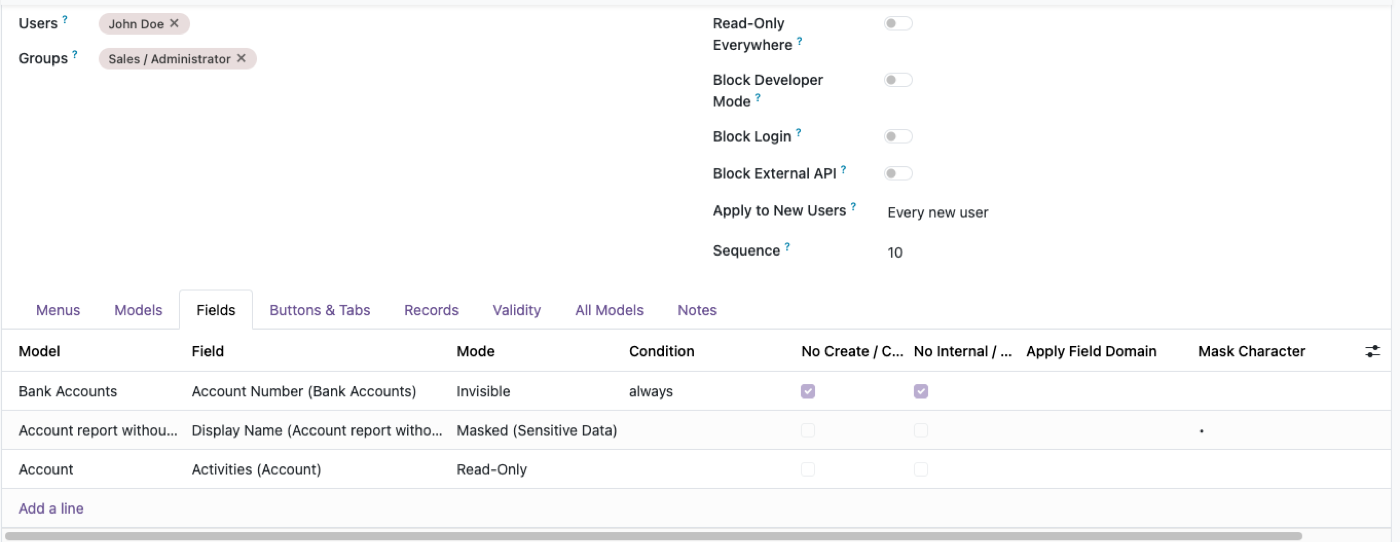
Open the field's permissions
Pick the model and field inside Access Manager Pro — no XML, no view editor.
Set the state to Invisible
Choose which Access Profile the rule applies to; other profiles are unaffected.
Confirm it holds everywhere
Check the field from a report or the API, not just the form — it should be gone from all of them.
Why a groups attribute on one view is not field security
Native Odoo lets you put a groups attribute on a field in a specific form. That is a view instruction. Another inherited view, a list, a report, an export, or an external API read can still return the value. The sales team you hid cost from on the product form can still see it on a pricelist dump.
Real field security is field access: the server refuses to send the field to that user, whichever door they use. Access Manager Pro’s Invisible state is that layer, per Access Profile, without editing XML every time the role changes. The longer argument is field-level security in Odoo.
Invisible is not the same as taking the model away
If the group should not open products at all, turn off the model — that is access rights, not a hidden field. Hide a field when they still need the form (to sell, to pick, to invoice) and must not see one column.
Typical Invisible targets: cost price, margin, vendor name on a purchase line, internal notes, salary on an employee form that warehouse staff can otherwise open. If they should see the number but not edit it, use read-only by group instead.
Check the API and the export, not just the form
After you hide a field, log in as that user and: open the form, export the list, hit a related smart button, and — if they have an API key — call read on the model. If any of those still show the value, you hid a widget, not the field.
Odoo Studio can hide a field in one view the same way XML can. Studio does not create server-side field access. Treat Studio as UI. Treat field access as security. Access Manager vs Studio.
A practical list of fields people actually hide
Start with money and identity, not decoration. Cost and margin on products. Credit limit and payment terms the sales person should see but not always change (that last one is often Read Only). Bank account and national ID on contacts and employees — mask if they need to match the last four digits; Invisible if they should not know it exists. Internal chatter is a different problem; this page is structured fields.
Do not hide a required field without a default or a workflow that fills it. You will train people to use another login. Combine with data masking when the job is “confirm this is the right person” rather than “never show the value.”
The rest of the cluster
Before you set it up
Does hiding a field in a view actually secure it?
No. A groups attribute on one form hides it there; other views, reports and the API can still return the value. Odoo’s field access is the real control. Longer version: field-level security in Odoo.
Is Invisible the same as Read Only?
No. Invisible hides the value; Read Only shows it but blocks edits. Use read-only by group when people still need to see the number.
Does this hold over the API?
It should, if you enforce it server-side rather than in view XML. Odoo security applies to RPC and JSON-2 as well as the UI.
Ready to lock this down?
Try it on the live sandbox first — nothing to install.